CS2106 notes
A comprehensive Note
CS2106 Lecture summary
1. Intro to OS
1. OS structures
1. 单体结构 (Monolithic)
- 核心特点: 内核 (Kernel) 是一个巨大的程序。所有的服务和组件都是内核的 组成部分 (integral part)。
- 设计原则: 采用良好的软件工程 (SE) 原则,注重模块化、接口分离和实现。
- 优点:
- Well understood: 结构相对直接。
- Good performance: 所有组件都在同一个地址空间内,通信开销低。
- 缺点
- 高度耦合 (Highly coupled components): 各组件紧密相连。
- complicated internal structure): 随着发展,可能演变为一个非常庞大和难以维护的系统。
2. 微内核 (Microkernel)
- 核心特点: 内核 small & clean,它只提供basic and essential facilities,如:
- IPC - Inter-Process Communication
- address space management
- thread management
- Higher level services: 所有其他服务(e.g. file system, drivers, network protocols, etc.)都被构建在这些基本功能之上,并作为服务器进程运行在OS 之外。它们通过 IPC 与内核和彼此通信。
- 优点:
- more robust & extensible: 因为服务在用户空间运行,一个服务的崩溃通常不会导致整个内核崩溃。
- better isolation & protection: 内核与高级服务之间有明确的界限。
- 缺点:
- Lower performance: 由于服务之间的通信需要通过 IPC 机制,相比单体内核的直接函数调用,这会引入额外的开销。
2. 虚拟机 (Virtual Machine)
- 定义: 虚拟机(Virtual Machine),也称为 Hypervisor,是 硬件的软件仿真 (A software emulation of hardware),它给客户操作系统(guest OS)提供了 底层硬件的虚拟化 (virtualisation of underlying hardware),创造出完整硬件的错觉 (illusion of complete hardware)。
- Type 1 Hypervisor (裸金属 Hypervisor):
- 运行位置: 直接运行在 物理硬件 上。
- 功能: 它直接管理硬件资源,并为各个 客户 OS (guest OS's) 提供独立的 VM。
- 示例: IBM VM/370、VMware ESXi、Microsoft Hyper-V。
- Type 2 Hypervisor (宿主式 Hypervisor):
- 运行位置: 作为一个 普通程序 运行在 宿主 OS (host OS) 之上。
- 功能: 客户 OS 运行在这个宿主 OS 内部的 VM 中。
- 示例: VMware Workstation、Oracle VirtualBox。
- Type1相当于hypoviser本身是一个轻量级操作系统,直接安装在物理硬件上,权限非常高且隔离性更强;而type2安装在宿主操作系统上,相当于一个应用程序
2. Process Abstraction
A Process is a dynamic abstraction for an executing program. It encompasses all the necessary information to describe a running program.
Process Components (Context):
A process consists of an executable binary (instructions and data) and the following contexts during execution:
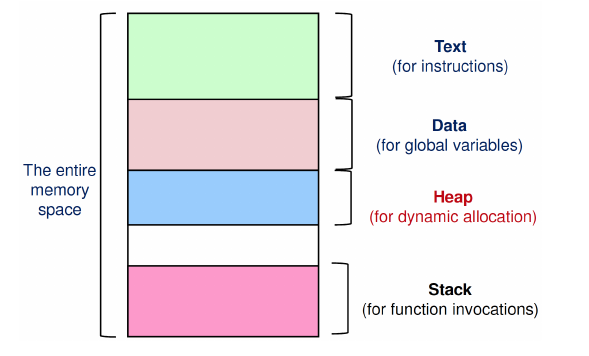
- Memory Context:
- Text: Program instructions.
- Data: Global variables.
- Heap: For dynamic memory allocation (grows typically upwards).
- Stack: For function invocations (grows typically downwards).
- Hardware Context: General Purpose Registers, Program Counter (PC), Stack Pointer (SP), Frame Pointer (FP).
- OS Context: Process ID (PID), Process state, etc.
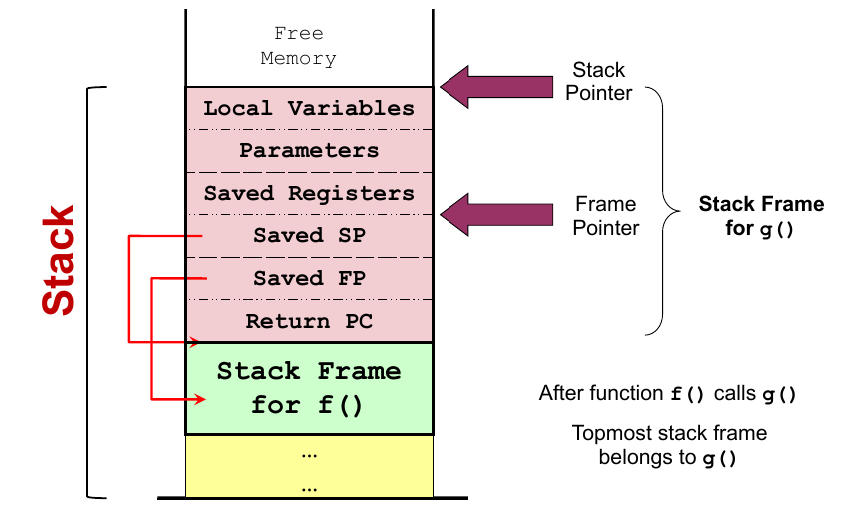
2.2 Stack Memory
Stack memory stores information for a function invocation in a structure called a stack frame. Key pointers:
- Stack Pointer (SP): Points to the top (first unused location) of the stack region.
- Frame Pointer (FP): Points to a fixed location within the stack frame.
2.4 Process Identification & State
-
Process ID (PID): A unique number assigned to a process.
-
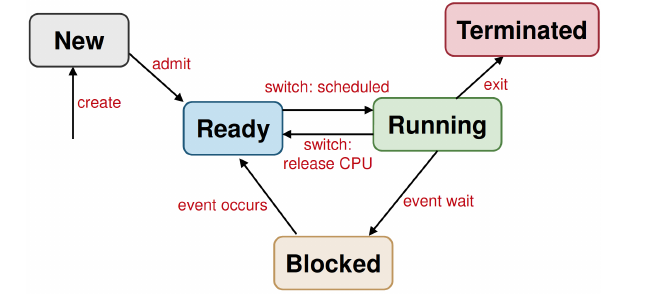
5-State Process Model
The process state indicates its execution status and changes due to various events:
| State | Description | Key Transitions |
|---|---|---|
| New | Process is being created, not yet ready. | New Ready (Admit) |
| Ready | Process is waiting to be executed on the CPU. | Ready Running (Dispatch) |
| Running | Process is currently executing on the CPU. | Running Ready (Time Out/Switch) |
| Blocked | Process is waiting for an event (e.g., I/O completion). | Running Blocked (Event wait) |
| Terminated | Process finished execution; resources are cleaned up. | Blocked Ready (Event occurs) |
2.5 Process Control Block (PCB)
-
The PCB is a data structure maintained by the OS that holds the entire execution context for a process (all the memory, hardware, and OS context information).
-
The Process Table is the collection of all PCBs.
This is also covered in CS2106 lab post.
2.6 System Calls
The mechanism used to allow user programs to request services from the OS kernel, involving a transition from user mode to kernel mode via a special instruction (like a TRAP).
System Call Steps
- Library Call: The application invokes a standard library function (e.g.,
read,open). - Parameter Setup: The library function places the System Call number and required arguments into designated CPU registers.
- Mode Switch (TRAP): A special instruction (the TRAP) is executed to safely switch the CPU from User Mode to Kernel Mode.
- Kernel Dispatch: The OS kernel's dispatcher reads the System Call number to locate and call the appropriate handler function.
- Kernel Execution: The kernel handler executes the requested privileged operation (e.g., accessing a file or device).
- Return Value Setup: The kernel sets the system call's result (e.g., success code or data) in the registers.
- Mode Switch Back: A return instruction is executed to switch the CPU back to User Mode, restoring the user program's context.
- Library Return: The library function retrieves the result from the registers and returns it to the application program.
2.7 Exception & Interrupt
- Exception: A synchronous event (occurs due to the program's execution, e.g., division by zero).
- Interrupt: An asynchronous event (external to the program's execution, e.g., I/O completion) that causes the program to suspend execution.
2.8 Process Abstraction: Unix Examples
fork(): Creates a duplicate child process.exec(): Replaces the current process's memory space and program with a new executable.wait(): Parent process waits for a child process to terminate.void exit(int status);status is 0 for normal, else problematic. Does not return. (different fromreturn, exit the process even if in the function)- Zombie Process: A child process that has terminated but still has its PCB entry in the process table because the parent has not yet called
wait(). - Orphan Process machenism: If the parent process exited, but the child process haven't completed executing, then the child will be re-parented to
initprocess in the OS. Theinitprocess will clear the process so that it will not become a permanent zombie process.
3. Process Scheduling
1. CPU Scheduling Criteria (3.1)
1. Objectives
- Maximize:
- CPU Utilization
- Throughput (number of jobs completed per unit time)
- Minimize:
- Turnaround Time (time from submission to completion)
- Waiting Time (time spent waiting for CPU)
- Response Time (time until first gain CPU)
2. Types of Scheduling Policies
- Non-preemptive: A process keeps the CPU until it either terminates or switches to the waiting state.
- Preemptive: A process is assigned a fixed time quota or can be interrupted by an event and forced to relinquish(交出) the CPU, to be resumed later.
2. Scheduling Components
- Scheduler: Selects which process in the ready queue should be executed next.
- Dispatcher: Gives control of the CPU to the process selected by the scheduler. This involves:
- Context Switching.
- Switching to User Mode.
- Jumping to the proper location in the user program to resume execution.
3. Scheduling Algorithms for Batch Processing
1. First-Come First-Served (FCFS)
- Characteristic: Non-preemptive.
- Processes are executed in the order they arrive.
- Simple, but can result in a high average waiting time
2. Shortest-Job First (SJF)
-
Characteristic: Can be preemptive or non-preemptive.
The CPU is assigned to the process with the smallest next CPU burst.
-
Time Prediction: Predict the next burst time using methods like Exponential Averaging.
-
Advantage: Gives the minimum average waiting time.
-
Challenge: Starvation
3. Shortest-Remaining Time (SRT)
- Characteristic: Preemptive version of SJF.
- A new job with a shorter remaining time than the currently running process's remaining time will preempt it.
- Good for minimizing waiting time for short jobs. (also has possibility of starvation)
4. Scheduling Algorithms for Interactive Systems (3.5)
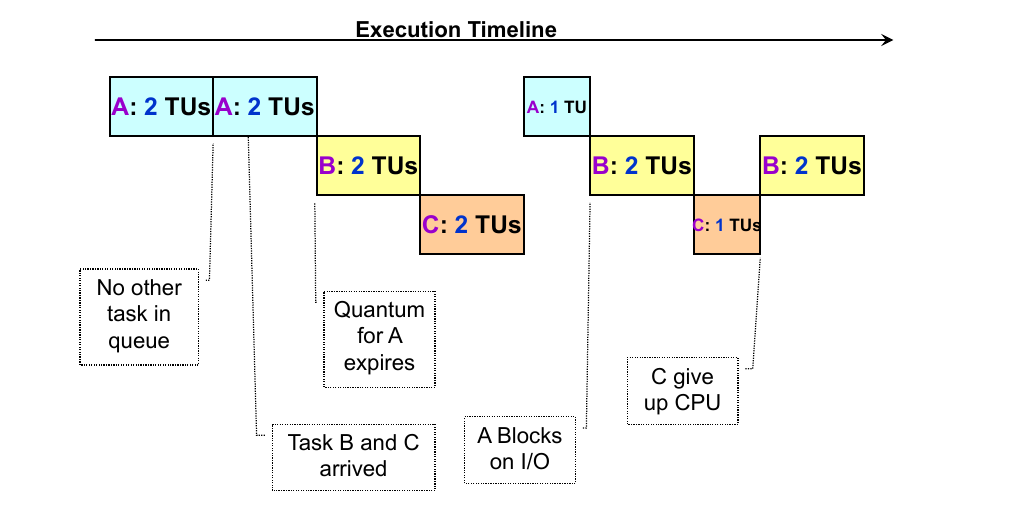
1. Round Robin (RR)
-
Characteristic: Preemptive, uses a fixed time quantum (q).
-
Each process gets at most one time quantum of CPU time before being placed back at the end of the ready queue.
-
Prioritizes good Response Time.
2. Priority Scheduling
-
Characteristic: Can be preemptive or non-preemptive.
-
The CPU is allocated to the process with the highest priority.
-
Problem: Starvation—low-priority processes may wait indefinitely.
-
Solution: decrease the priority of currently running process after every time quantum.
-
Hard to guarantee or control the exact amount of CPU time given to a process using priority.
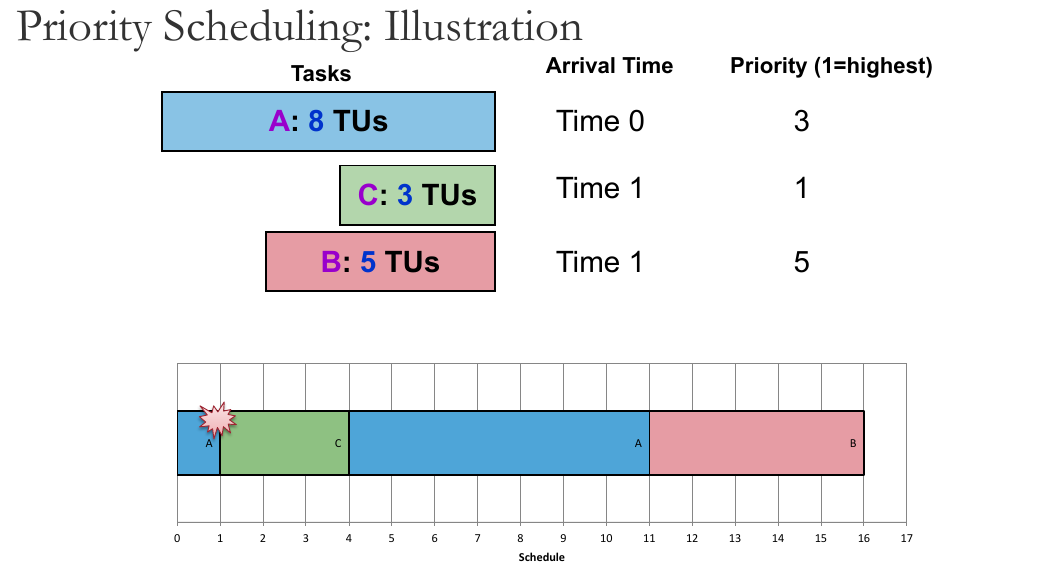
Priority Scheduling: Priority Inversion:
Consider the scenario:
-
Priority: {A=1,B=3,C=5} (1 is highest)
-
Task C starts and locks a resource (e.g., file)
-
Task B preempts C
- C is unable to unlock the resource
-
Task A arrives and needs the same resource as C
- but the resource is locked!
-
→ Task B continues execution even if Task A has higher priority
-
Known as Priority Inversion:
- Lower priority task preempts higher priority task
We should avoid this scenario when designing scheduling schemes.
-
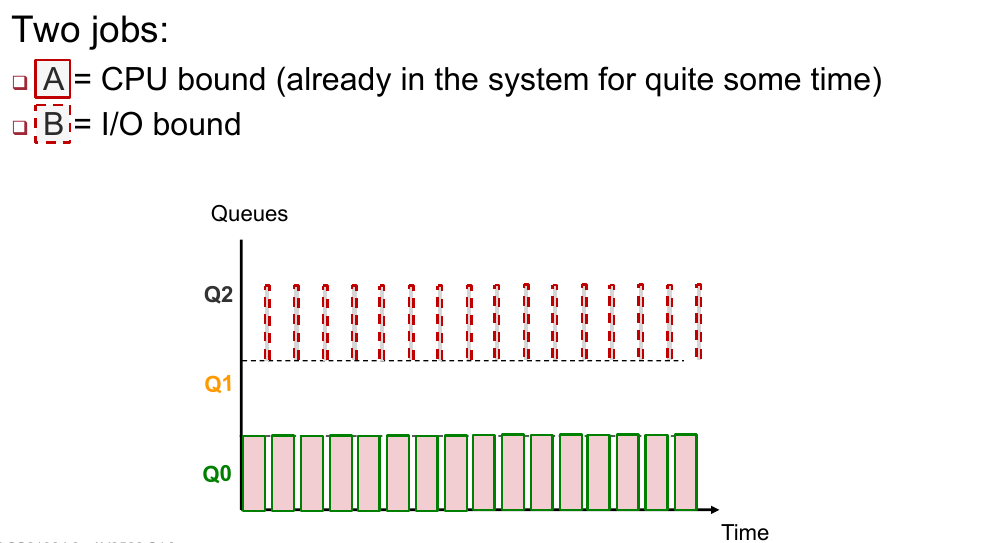
3. Multilevel Feedback Queue (MLFQ)
Adaptive, minimising both response time for IO-bound and turnaround time for CPU-bound
Rules:
- Priority(A) > Priority(B) → A runs
- Priority(A) == Priority(B) → A and B in RR
- New job → highest priority
- If a job fully utilised its time slice → priority reduced
- If a job gives up/blocks before it finishes the time slice → priority retained
Shortcomings:
(1) Starvation – if there are too many interactive jobs, long-running jobs will starve.
(2) gaming the scheduler by running for 99% of time quantum, then relinquish the CPU.
(3) the priority of a interactive program may be reduced.
Possible solution:
- Priority boost: after some time period S, move all jobs to the highest priority. Guaranteeing no starvation as highest priority → RR, and the case when CPU-bound job has become interactive
Lottery Scheduling
- Give out "lottery tickets" to processes. When a scheduling decision is needed, a ticket is chosen randomly among eligible tickets.
- In the long run, a process holding X% of tickets can win X% of the lottery held and use the resource X% of the time.
- Reponsive: newly created process can participate in next lottery
- Good level of control: A process can be given lottery tickets to be distributed to its child process, an important process can be given more lottery tickets, each resource can have its own set of tickets (different proportion of usage per resource per task)
- Simple implementation
Here is the clean Markdown version in English, without any references, ready for you to copy.
4. Inter-Process Communication (IPC)
1. Overview
Since processes have independent memory spaces, sharing information is difficult. IPC mechanisms are required to allow cooperating processes to exchange data.
- Two Generic Mechanisms: Shared Memory and Message Passing.
- Two Unix-Specific Mechanisms: Pipe and Signal.
2. Shared Memory
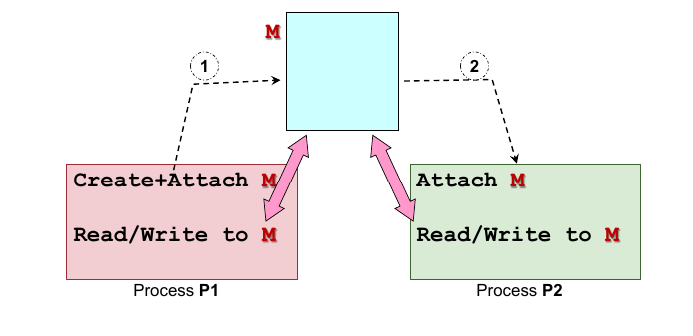
Concept
-
Process creates a shared memory region .
-
Processes ( and ) attach region to their own memory address space.
-
Once attached, behaves like a normal memory region; any writes are immediately visible to other processes sharing it.
-
OS Involvement: The OS is only involved during the creation and attachment steps.
Pros & Cons
- Advantages:
- Efficient: High performance because the OS is not involved in the actual data exchange (no system calls for reading/writing).
- Ease of Use: Information of any type or size can be written easily (accessed like variables/arrays).
- Disadvantages:
- Synchronization: The OS does not manage access during communication. Processes must explicitly synchronize access to avoid race conditions, which is harder to implement.
POSIX Implementation Steps
- Create/Locate: Use
shmgetto create or find a region ID. - Attach: Use
shmatto map the region to the process memory. - Communicate: Read/Write directly to the memory location.
- Detach: Use
shmdtafter the process is done using it. - Destroy: Use
shmctlto remove it from the system (only one process needs to do this).
program
Master:
#include <stdio.h>
#include <stdlib.h>
#include <sys/shm.h>
#include <unistd.h>

int main() {
    int shmid;
    int *shm;
    int i;

    // 1. 创建共享内存 (Create Shared Memory)
    // IPC_PRIVATE: 创建一个新的共享内存段
    // 40: 大小 (bytes)
    // 0600: 权限 (只有拥有者可读写)
    shmid = shmget(IPC_PRIVATE, 40, IPC_CREAT | 0600);

    if (shmid == -1) {
        perror("shmget failed");
        exit(1);
    }

    printf("Shared Memory ID = %d\n", shmid); // 打印 ID,Slave 需要这个 ID
    printf("Waiting for slave to write data...\n");

    // 2. 附加到进程内存空间 (Attach)
    shm = (int*) shmat(shmid, NULL, 0);
    if (shm == (int*) -1) {
        perror("shmat failed");
        exit(1);
    }

    // 3. 初始化标志位 (Synchronization)
    // shm[0] 用作标志位: 0 表示数据未准备好,1 表示准备好
    shm[0] = 0;

    // 4. 等待 Slave 写入 (Wait loop)
    while (shm[0] == 0) {
        sleep(1); // 每秒检查一次
    }

    // 5. 读取数据 (Read Data)
    printf("\nData detected! Reading from shared memory:\n");
    for (i = 1; i <= 3; i++) {
        printf("Value %d: %d\n", i, shm[i]);
    }

    // 6. 分离并销毁 (Detach and Destroy)
    shmdt((char*) shm);               // Detach
    shmctl(shmid, IPC_RMID, 0);       // Destroy: 只有 Master 需要做这一步

    printf("Shared memory destroyed. Exiting.\n");
    return 0;
}
slave:
#include <stdio.h>
#include <stdlib.h>
#include <sys/shm.h>

int main() {
    int shmid;
    int *shm;
    int i;
    int input;

    // 1. 获取 Shared Memory ID
    // 在实际场景中 ID 可能通过文件或参数传递,这里手动输入模拟讲义中的例子
    printf("Enter Shared Memory ID: ");
    scanf("%d", &shmid);

    // 2. 附加到进程内存空间 (Attach)
    // 注意:这里不需要 IPC_CREAT,因为内存已经由 Master 创建
    shm = (int*) shmat(shmid, NULL, 0);
    if (shm == (int*) -1) {
        perror("shmat failed");
        exit(1);
    }

    // 3. 写入数据 (Write Data)
    printf("Enter 3 integers to send to Master:\n");
    for (i = 1; i <= 3; i++) {
        printf("Enter number %d: ", i);
        scanf("%d", &input);
        shm[i] = input; // 写入共享内存的第 1, 2, 3 个位置
    }

    // 4. 修改标志位通知 Master (Signal Master)
    printf("Writing complete. Signaling master...\n");
    shm[0] = 1; // 设置标志位为 1,告诉 Master 数据已准备好

    // 5. 分离 (Detach)
    // Slave 不需要销毁 (Destroy) 内存,只需分离即可
    shmdt((char*) shm);

    printf("Done. Exiting.\n");
    return 0;
}
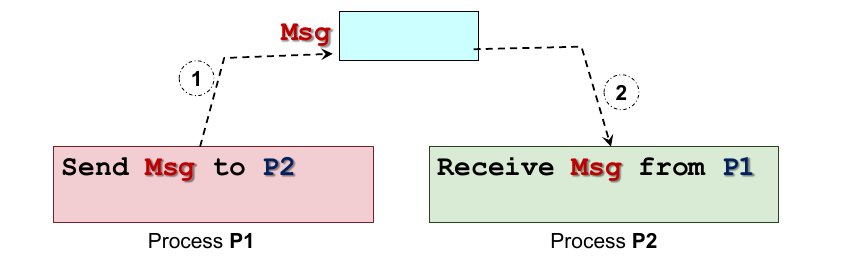
3. Message Passing
Concept
- Process prepares a message and explicitly sends it to .
- Messages are stored in Kernel Memory Space during transit.
- Every Send/Receive operation requires a System Call (OS intervention).
Naming Schemes
- Direct Communication:
- Sender/Receiver must explicitly name the other party (e.g.,
Send(P2, Msg)). - Characteristic: One link per pair of communicating processes inside kernel memory space.
- Sender/Receiver must explicitly name the other party (e.g.,
- Indirect Communication:
- Messages are sent to a "Mailbox" or "Port" (the process must create a mail in kernel memory space, like a shared memory. But it is handled by the kernel).
- Characteristic: A single mailbox can be shared among multiple processes.
Synchronization Behaviors
- Blocking (Synchronous): The receiver is blocked (waits) until a message has arrived.
- Non-blocking (Asynchronous): The receiver returns immediately, either with the message (if available) or an error code indicating the message is not ready.
Pros & Cons
- Advantages:
- Portable: Easier to implement across distributed systems or networks.
- Easier Synchronization: Synchronization is often implicit in the send/receive primitives (e.g., blocking receive).
- Disadvantages:
- Inefficient: Requires frequent switching between User/Kernel modes and data copying overhead.
4. Unix Pipes
Concept
-
One of the earliest IPC mechanisms. It acts as a communication channel with two ends. (parallel to shared memory and message passing)
-
Unidirectional: Typically, one end is for reading, and the other is for writing.
-
Functions as a Circular Bounded Byte Buffer following the FIFO (First In, First Out) principle.
-
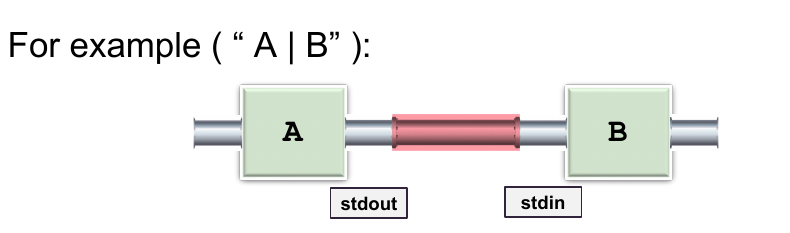
Commonly used in shells to link the
stdoutof one process to thestdinof another (e.g.,A | B).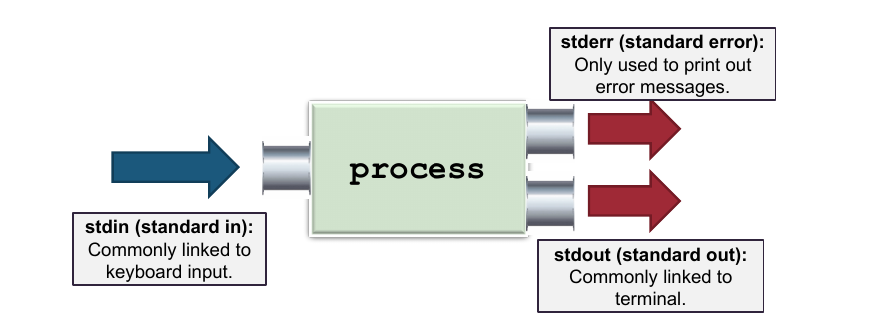
Implicit Synchronization
- Writers: Wait (block) if the buffer is full.
- Readers: Wait (block) if the buffer is empty.
Implementation
Created using the system call (default size 64kb):
int pipe(int fd[2]); // Returns 0 on success
- Returns an array of two file descriptors:
fd[0]: Reading endfd[1]: Writing end
- Typical usage involves
fork(), where parent and child processes close the unused ends to establish a one-way communication channel.
#include <stdio.h>
#include <stdlib.h>
#include <unistd.h>
#include <string.h>

// 定义管道的两端:0为读,1为写
#define READ_END 0
#define WRITE_END 1

int main() {
    int pipeFd[2];      // 用于存放两个文件描述符:fd[0] 和 fd[1]
    int pid;
    char buf[100];      // 接收缓冲区
    char *str = "Hello There!";

    // 1. 创建管道 (Create Pipe)
    // 必须在 fork() 之前创建,这样子进程才能继承这两个文件描述符
    if (pipe(pipeFd) == -1) {
        fprintf(stderr, "Pipe failed");
        return 1;
    }

    // 2. 创建子进程 (Fork)
    pid = fork();

    if (pid < 0) {
        fprintf(stderr, "Fork failed");
        return 1;
    }

    if (pid > 0) {
        /* ================= 父进程 (Writer) ================= */

        // 3. 关闭不需要的“读取端”
        // 父进程只负责写,所以关闭 pipeFd[0]
        close(pipeFd[READ_END]);

        // 4. 写入数据
        // 将字符串写入管道的“写入端” pipeFd[1]
        write(pipeFd[WRITE_END], str, strlen(str) + 1);

        // 5. 关闭“写入端”
        // 写完后必须关闭,这样读者(子进程)才能收到 EOF (End of File)
        close(pipeFd[WRITE_END]);
    } else {
        /* ================= 子进程 (Reader) ================= */

        // 3. 关闭不需要的“写入端”
        // 子进程只负责读,所以关闭 pipeFd[1]
        close(pipeFd[WRITE_END]);

        // 4. 读取数据
        // 从管道的“读取端” pipeFd[0] 读取数据到 buf
        // read 会阻塞,直到父进程写入数据
        read(pipeFd[READ_END], buf, sizeof(buf));

        // 5. 关闭“读取端”
        close(pipeFd[READ_END]);
    }

    return 0;
}
5. Unix Signals
Concept
- A form of IPC providing an asynchronous notification regarding an event sent to a process/thread.
- Used for notifications such as interrupts, memory access errors, or termination requests.
Handling Signal
Upon receiving a signal, the process must handle it via:
- Default Handler: The standard OS action (e.g., terminate the program).
- User-Supplied Handler: Custom code written by the programmer to catch specific signals (replacing the default behavior).
Common Examples
SIGKILL(Kill process immediately)SIGSTOP(Pause process)SIGSEGV(Segmentation Fault / Memory error)
Example Code
#include <stdio.h>
#include <signal.h>
#include <unistd.h>
#include <stdlib.h> // 为了使用 exit()

// 1. 定义自定义信号处理函数 (User defined handler)
// 当信号发生时,操作系统会暂停主程序,跳转到这个函数执行
void myOwnHandler(int signo) {
    if (signo == SIGSEGV) {
        printf("Memory access blows up! (Caught SIGSEGV)\n");
        // 必须退出程序,否则根据系统不同,可能会无限循环触发错误或导致未定义行为
        exit(1);
    }
}

int main() {
    int *ip = NULL; // 定义一个空指针

    // 2. 注册信号处理函数 (Register handler),后面所有这种异常都会走自定义函数。
    // 告诉 OS:如果收到 SIGSEGV 信号,请运行 myOwnHandler,而不是默认的崩溃
    if (signal(SIGSEGV, myOwnHandler) == SIG_ERR) {
        printf("Failed to register handler\n");
        return 1;
    }

    printf("About to trigger a segmentation fault...\n");

    // 3. 触发信号 (Trigger event)
    // 尝试向空地址写入数据,这将导致硬件异常,OS 会发送 SIGSEGV 给进程
    *ip = 123;

    // 这行代码永远不会执行,因为程序在上面已经跳转并退出了
    printf("This will not print.\n");

    return 0;
}
5. Process alternative - Threads
Why do we need threads instead of just using processes?
- Process Creation is Expensive: The
fork()model duplicates the entire memory space and process context. Context switching requires saving and restoring heavy process information. - Communication is Difficult: Independent processes have separate memory spaces. Passing information requires complex Inter-Process Communication (IPC) mechanisms.
- Concurrency: A traditional process has a single thread of control (executing one instruction at a time). Threads allow multiple parts of a program to execute conceptually simultaneously.
1. Process vs. Thread
A single process can contain multiple threads. It is important to distinguish what is shared between them and what is unique.
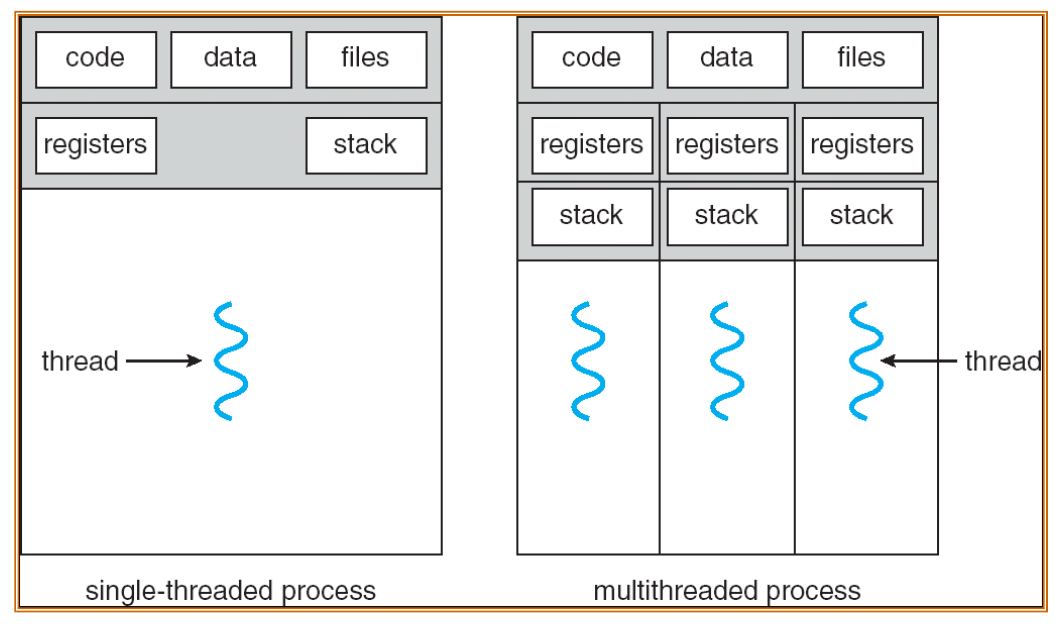
Shared Resources (Context)
Threads within the same process share:
- Memory Context: Text (code), Data, and Heap.
- OS Context: Process ID (PID), file descriptors, and other OS resources.
Unique Resources (Per Thread)
Each thread maintains its own:
- Identification: Thread ID.
- Registers: General purpose and special registers.
- Stack: For local variables and function calls.
Context Switching Comparison
- Process Switch: Involves switching the OS Context (PCB, task structure), Hardware Context, and Memory Context (Heavy).
- Thread Switch: Involves switching only the Hardware Context (Registers, Frame Pointer, Stack Pointer). This is much lighter/faster.
2. Benefits of Threads
- Economy: Requires significantly fewer resources to create and switch compared to processes.
- Resource Sharing: Because they share memory/data, no complex IPC is needed.
- Responsiveness: Multithreaded applications can remain responsive (e.g., one thread handles UI while another processes data).
- Scalability: Can utilize multiple CPUs/Cores effectively.
3 Problems & Challenges
- System Call Concurrency: The OS must ensure correctness when multiple threads make system calls simultaneously.
- Process Behaviour: Ambiguities in operations (e.g., Does
fork()duplicate all threads or just the calling one? If one thread callsexit(), does the whole process die?).
Ans: duplicate only one thread, all thread exits.
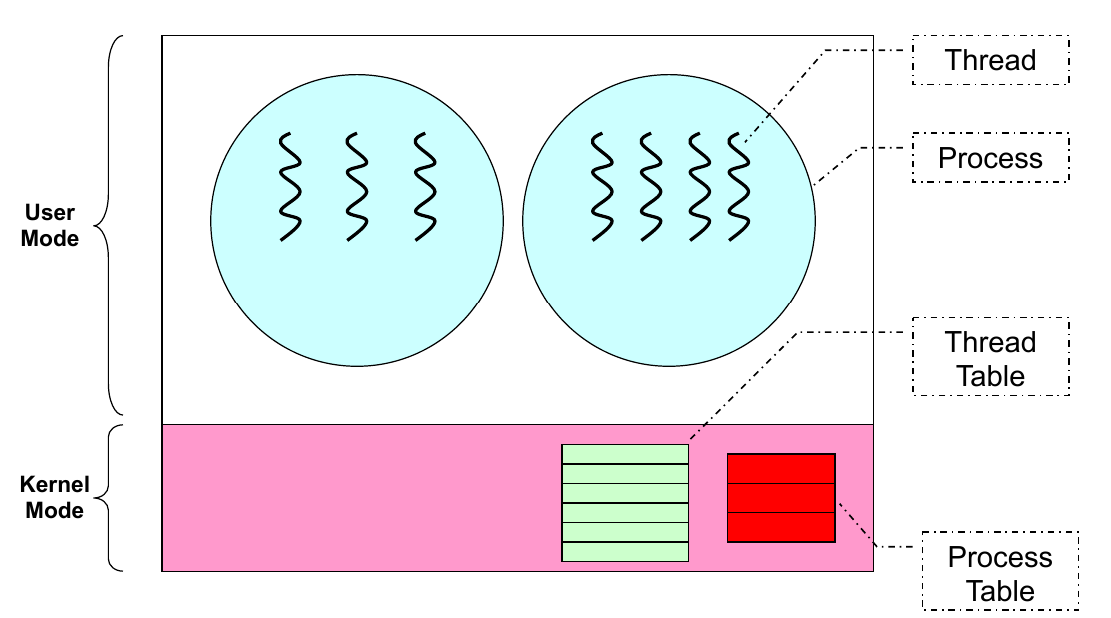
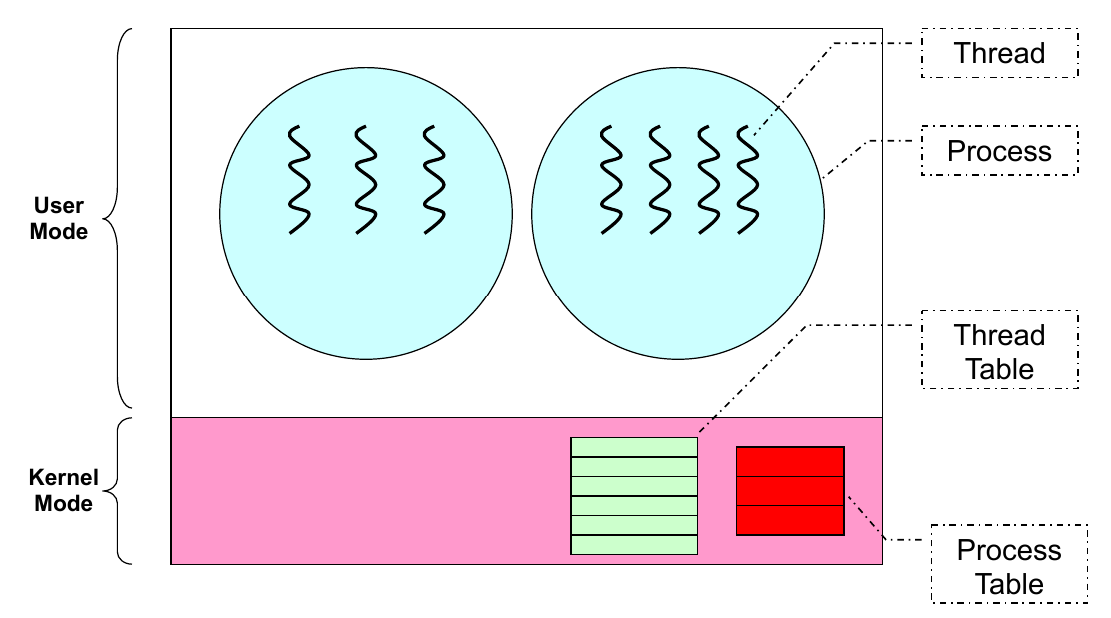
4. Thread Models
There are three main ways to implement threads:
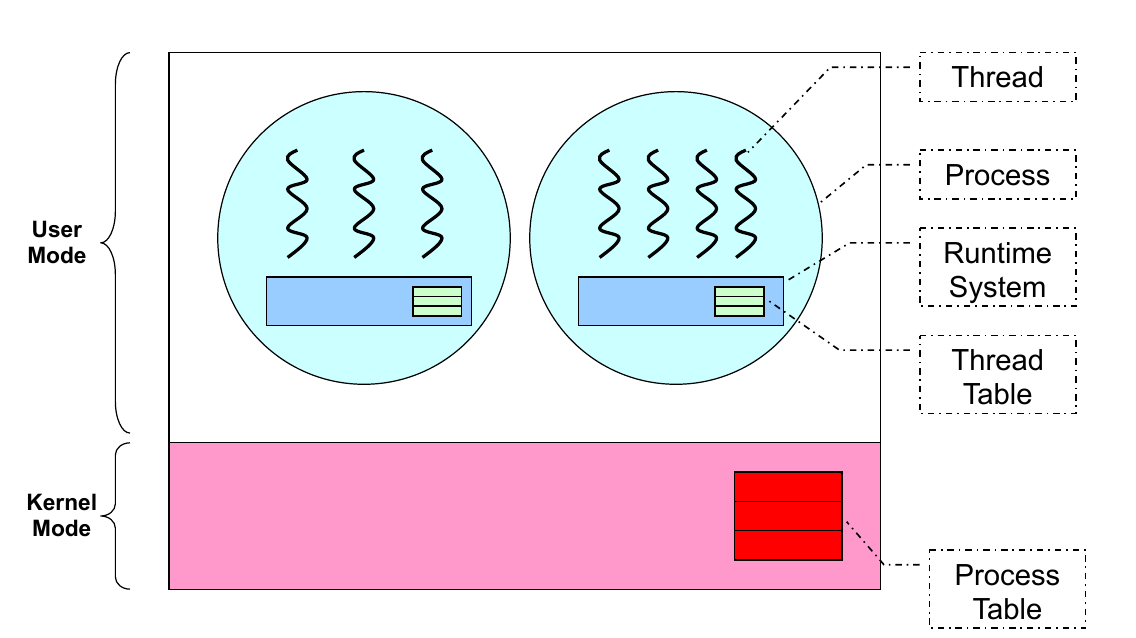
1. User Thread
-
Implementation: Implemented as a library in user space. The Kernel is unaware of these threads.
-
Pros: Fast (operations are just library calls), portable (works on any OS), flexible scheduling.
-
Cons: If one thread blocks (e.g., I/O), the entire process blocks. Cannot utilize multiple CPUs (OS sees it as one process). You can design thread scheduling yourself to prevent process from being blocked, but it is not automatically handled by your kernel anymore.
2. Kernel Thread
- Implementation: Managed directly by the OS. Operations are system calls.
- Pros: The Kernel can schedule individual threads. If one thread blocks, others can continue. Can use multiple CPUs.
- Cons: Slower (requires system calls), less flexible, more resource-intensive.
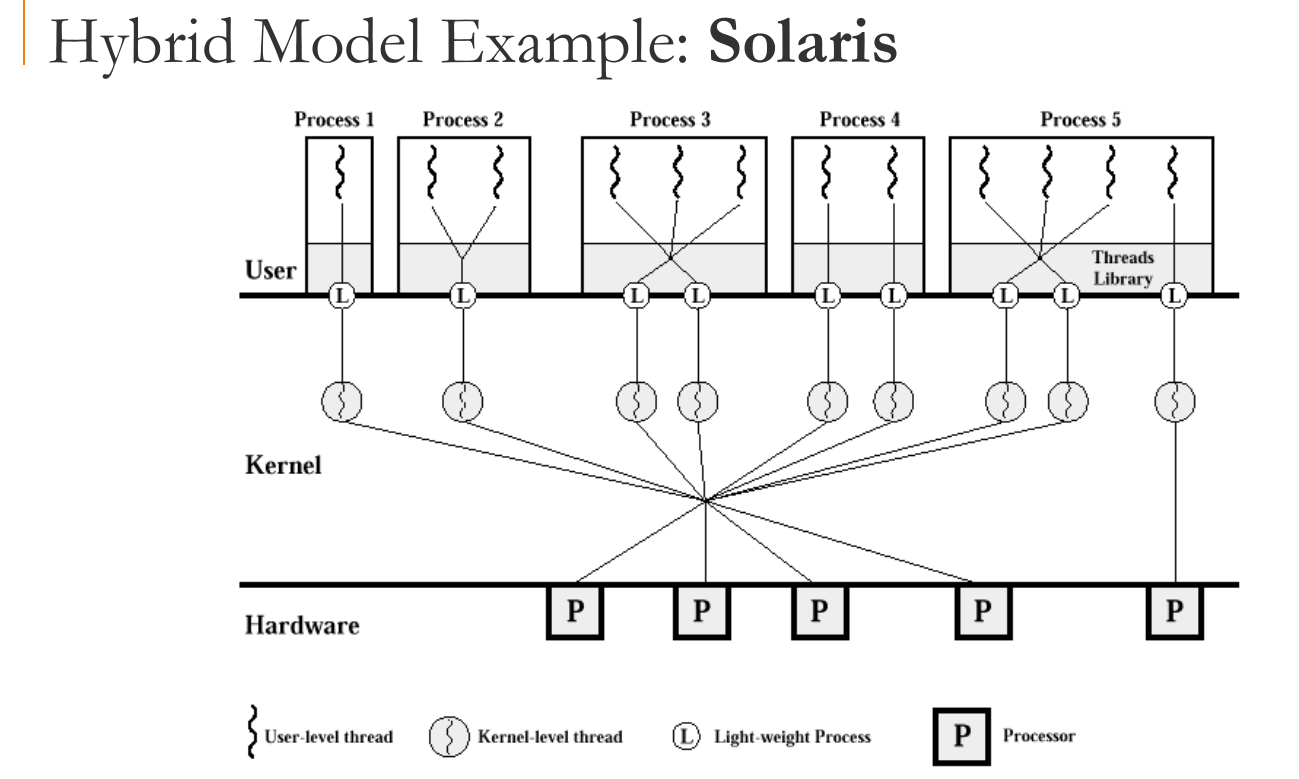
3. Hybrid Model
- Implementation: User threads are multiplexed onto Kernel threads.
- Pros: Combines flexibility of user threads with the concurrency of kernel threads.
4. Hardware Support (SMT)
- Evolution: Threads started as software mechanisms, then moved to OS support, and finally Hardware support.
- SMT (Simultaneous Multi-Threading): Modern processors (like Intel Hyperthreading) provide multiple sets of registers (hardware contexts) on a single core. This allows threads to run natively and in parallel on the same physical core.
5. POSIX Threads (pthreads)
The IEEE standard defining API and behavior for threads.
Key API Functions:
int pthread_create(...): Spawns a new thread.- Takes a function pointer (
startRoutine) and arguments. int pthread_exit(void* exitValue): Terminates the calling thread.int pthread_join(pthread_t threadID, void **status): Waits for a specific thread to terminate (similar towait()for processes).
(Note: Except for pthread_exit, these functions return 0 on success.)
Example Code:
#include <stdio.h>
#include <pthread.h>

// 线程要执行的函数
void* worker(void* arg) {
    // 打印传入的参数
    char* name = (char*)arg;
    printf("[%s] 正在运行...\n", name);

    // 【关键点 2】pthread_exit
    // 结束当前线程。等同于函数 return,但更显式。
    pthread_exit(NULL);
}

int main() {
    pthread_t tid;
    char* thread_name = "Thread-A";

    printf("[Main] 开始...\n");

    // 【关键点 1】pthread_create
    // 参数:线程ID指针, 属性(NULL), 运行函数, 传给函数的参数
    pthread_create(&tid, NULL, worker, (void*)thread_name);

    printf("[Main] 正在等待子线程...\n");

    // 【关键点 3】pthread_join
    // 阻塞主线程,直到 tid 对应的线程执行了 exit 或 return
    pthread_join(tid, NULL);

    printf("[Main] 子线程已汇合,主程序退出。\n");
    return 0;
}
6. Synchronization
1. Overview
-
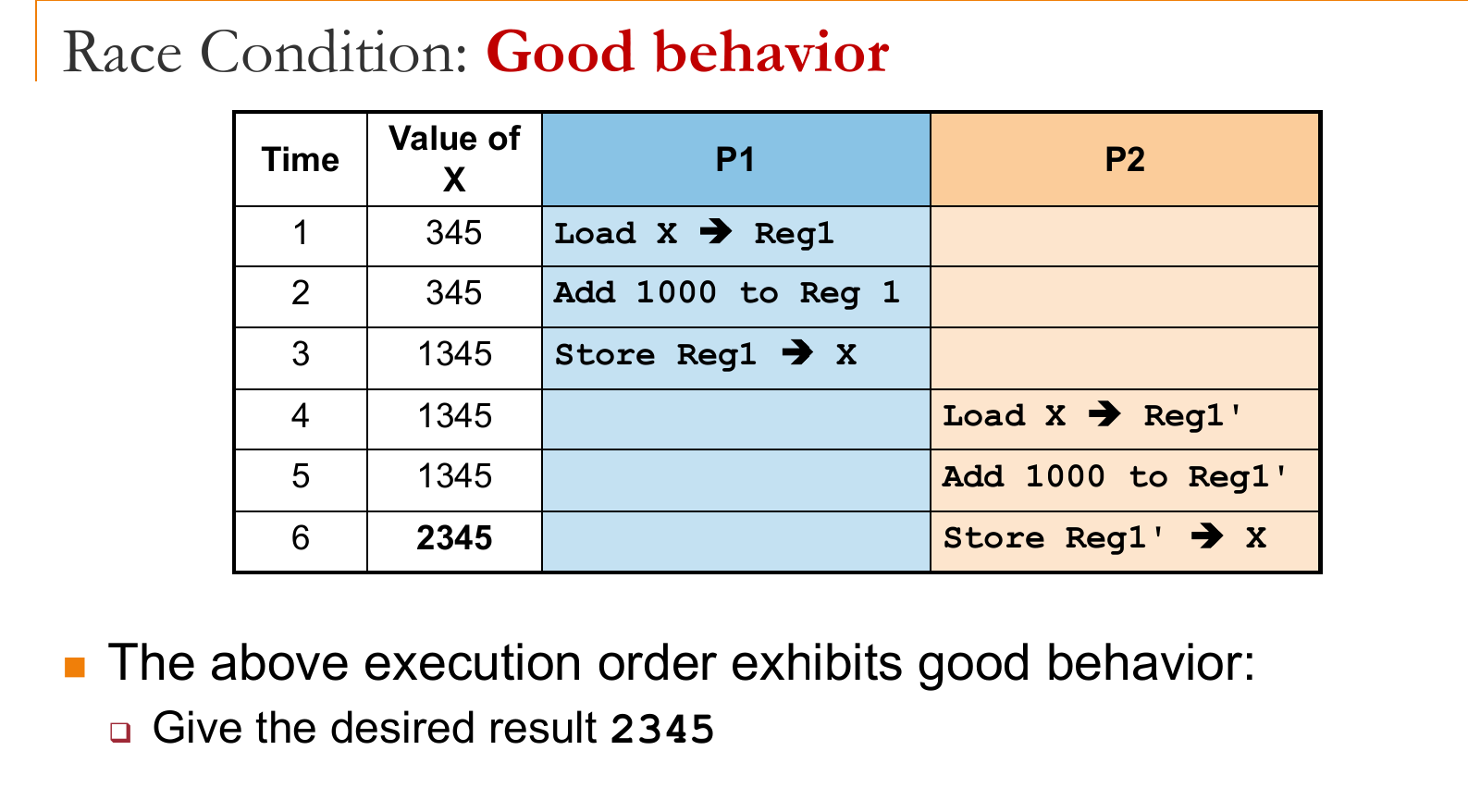
Race Condition: Occurs when two or more processes execute concurrently in an interleaving fashion and share a modifiable resource. The execution outcome depends on the specific order of access (non-deterministic).
-
Goal: Ensure deterministic execution for sequential processes by managing access to shared resources.
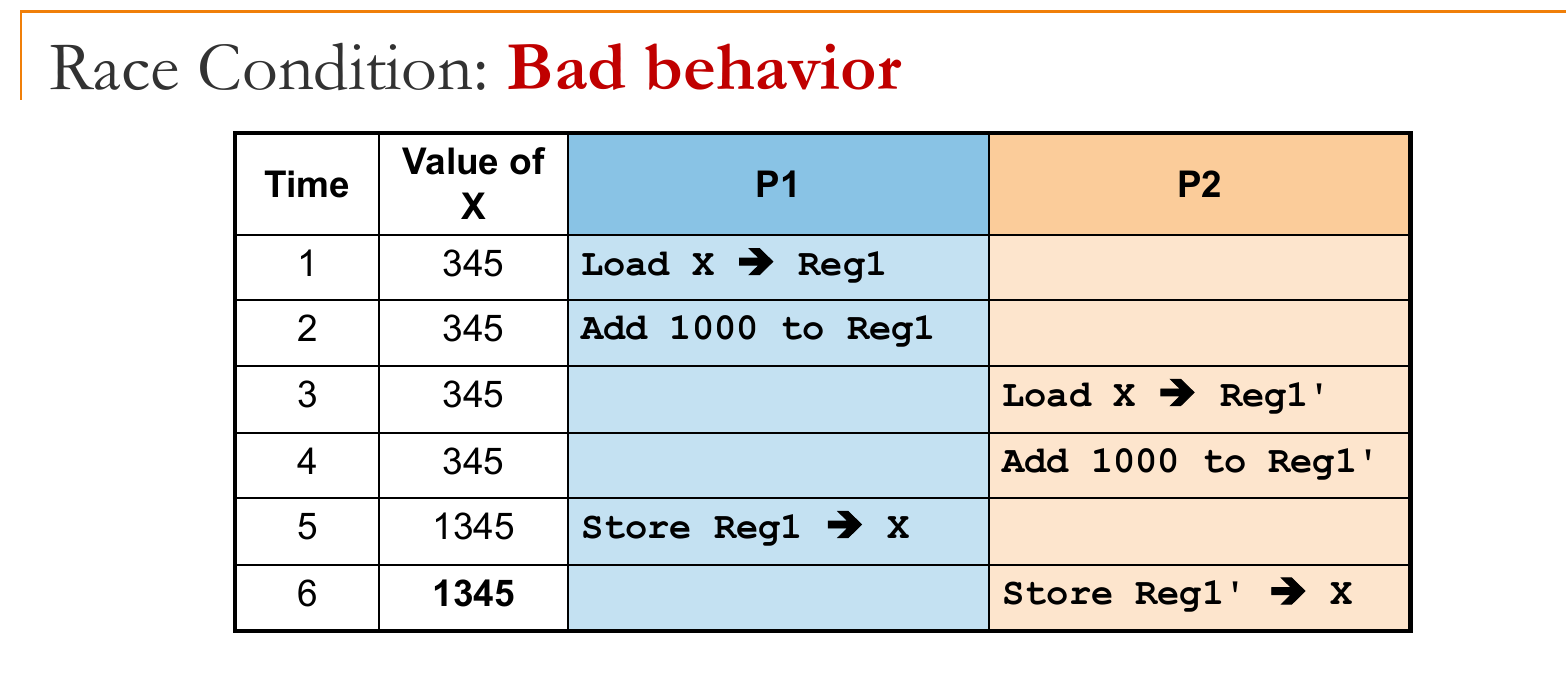
2. Critical Section (CS)
Code segments where race conditions may occur are designated as Critical Sections. At any time, only one process can execute in the CS.
1. Properties of Correct Implementation:
- Mutual Exclusion: If a process is in the CS, no other process can enter.
- Progress: If no process is in the CS, a waiting process should be granted access.
- Bounded Wait: There must be a limit on how many times other processes can enter the CS before a requesting process is granted access. (not cutting queue)
- Independence: A process not in the CS should not block other processes.
2. Symptoms of Incorrect Synchronization:
- Deadlock: All processes are blocked; no progress is made.
- Livelock: Processes constantly change state to avoid deadlock but make no real progress (often not blocked).
- Starvation: Some processes are perpetually denied resources and never progress.
3. Implementations of Critical Section (not important)
Assembly Level (Hardware)
- Test-and-Set: An atomic machine instruction. It loads the current content of a memory location into a register(to check if it is 1) and stores a '1' into that memory location simultaneously.
- Disadvantage: Uses busy waiting (wasteful of CPU).
High-Level Language (Software)
- Peterson’s Algorithm: A classic software-based solution for two processes using
TurnandWantarrays.- Disadvantages: Involves busy waiting; low-level and complex to implement correctly; limited to mutual exclusion.
4. Semaphores (High-Level Abstraction)
A generalized synchronization mechanism proposed by Dijkstra.
-
Definition: A protected integer variable .
-
Operations (Atomic):
- Wait(S) (or P/Down): If , block (sleep). Else, decrement .
- Signal(S) (or V/Up): Increment . Wakes up one sleeping process (if any).
-
Invariant: .
-
Types:
- Binary Semaphore (Mutex): Value is 0 or 1. Used for mutual exclusion.
- General/Counting Semaphore: Can take any non-negative integer value.
See CS2106 lab3 for implementation.
5. Classical Synchronization Problems (not important)
Producer-Consumer
- Scenario: Processes share a bounded buffer of size K.
- Constraint: Producers insert only if buffer is not full ( items). Consumers remove only if buffer is not empty ( items).
- Solution: Uses semaphores
notFull,notEmpty, andmutexto avoid busy waiting.
Readers-Writers
- Scenario: Processes share a data structure.
- Constraint:
- Writers: Need exclusive access (no other writer or reader).
- Readers: Can access concurrently with other readers.
Dining Philosophers
- Scenario: 5 philosophers sit around a table with 5 single chopsticks. To eat, one needs both left and right chopsticks.
- Issues: Naive solutions lead to deadlock (everyone picks up left chopstick) or livelock.
- Solutions:
- Tanenbaum’s Solution: Uses states (THINKING, HUNGRY, EATING) and checks neighbors before eating.
- Limited Eater: Limit the number of philosophers at the table to 4 (using a semaphore for seats) to prevent deadlock.
6. Implementations in Practice
- POSIX Semaphores:
sem_wait,sem_postprovided by<semaphore.h>. - Pthreads:
pthread_mutex_lock,pthread_cond_wait.
Here are comprehensive study notes on Memory Management based on the provided lectures (L7, L8, L9) and summary sheets.
7. Memory Management
1. Memory Abstraction
Directly accessing physical memory is dangerous (no protection) and inefficient (hard to relocate). The OS provides Logical Addresses to decouple the process view from physical hardware.
- Base & Limit Registers: A simple hardware mechanism for abstraction.
- Base Register: Holds the starting physical address of the process.
- Limit Register: Holds the size of the process.
- Translation:
- Protection: Hardware checks if . If not, a trap (segmentation fault) is generated.
- Pros/Cons: Simple protection; easy relocation (just change Base); but requires contiguous physical memory.
3. Contiguous Memory Allocation
The entire process is loaded into one continuous block of physical memory.
-
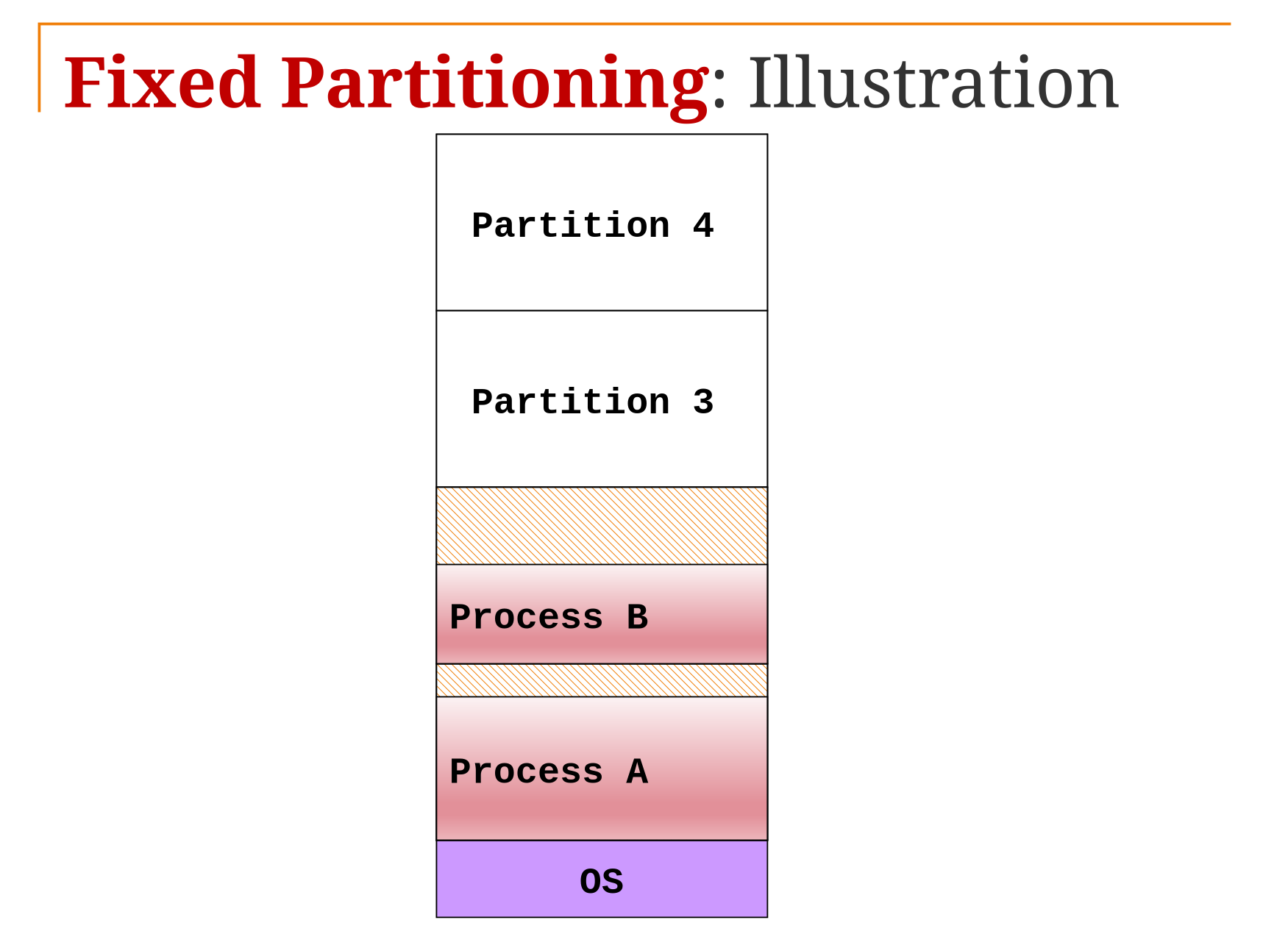
Fixed Partitioning:
-
Memory is divided into static, fixed-size regions.
-
Pros:
Easy to manage
Fast to allocate -
Cons:
Partition size need to be large enough to contain the largest processes.
Internal Fragmentation (e.g., putting a 2MB process in a 4MB partition wastes 2MB inside the partition).
-
-
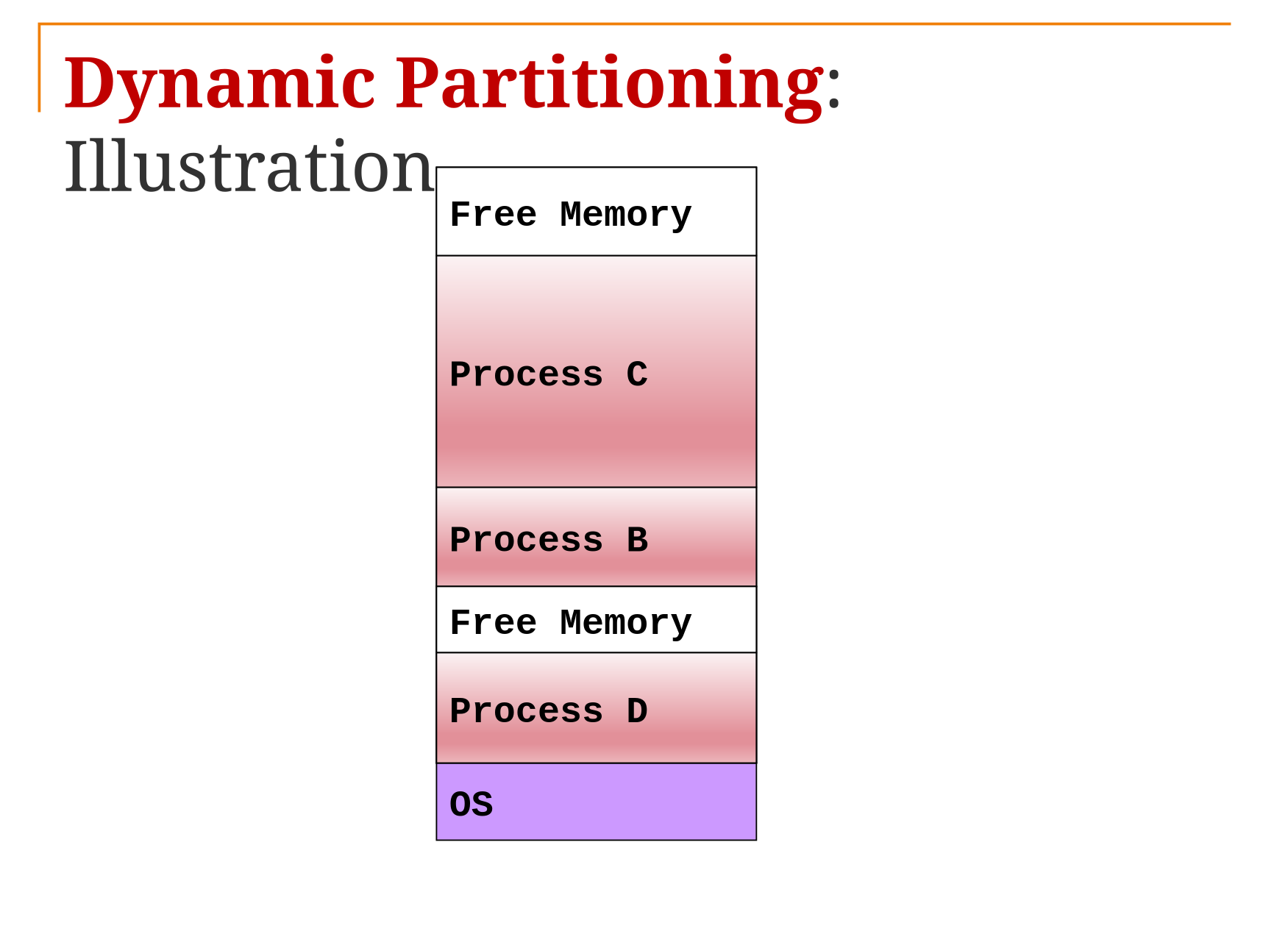
Dynamic Partitioning:
-
Partitions are created dynamically to fit the exact size of the process.
-
Pros: Flexible and remove internal fragmentation.
-
Cons: Need to maintain more information in OS; More time to locate appropriate region.
-
Problem: External Fragmentation (Memory has enough total free space, but it is scattered in small non-contiguous holes).
-
Solution: Compaction (Shifting processes to consolidate free space), but this is computationally expensive.
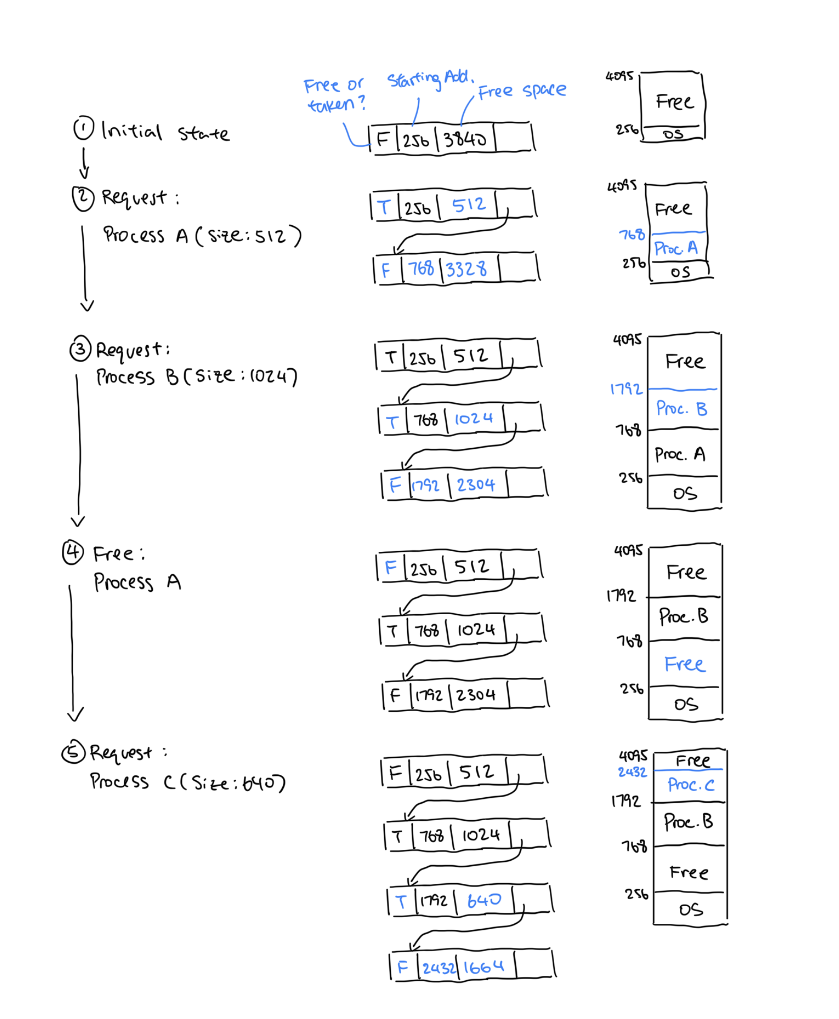
(picture taken from https://github.com/jasonqiu212/nus-cheatsheets/blob/main/CS2106/cs2106-final-cheatsheet.pdf)
We use a linked list to maintain the data.
-
4. Allocation Algorithms for Dynamic Partitioning
When a process requests bytes, the OS must find a hole (free block):
- First-Fit: Scan the list and take the first hole that is big enough. (Fastest).
- Best-Fit: Search the entire list for the smallest hole . (Slow, creates tiny, useless holes).
- Worst-Fit: Search the entire list for the largest hole. (Leaves larger, potentially useful remaining holes).
5. The Buddy System
A compromise between fixed and dynamic partitioning that speeds up merging.
- Memory Model: Memory size is . All allocations are rounded up to the nearest power of 2.
- Allocation: If a block of size is requested and only larger blocks are available (e.g., ), the large block is recursively split into two "buddies" of equal size until the target size is reached.
- Deallocation (Coalescing): When a block is freed, the OS checks its "buddy". If the buddy is also free, they are merged back into a larger block.
- Buddy Logic: Two blocks are buddies if they have the same size and their addresses differ only at the -th bit.
- See CS2106 Lab 4 for implementation.
8. Disjoint Memory Schemes
These schemes allow a process to be scattered across physical memory, eliminating the need for contiguous allocation.
1. Paging
-
Basic Idea:
- Logical Memory is divided into fixed-size blocks called Pages.
- Physical Memory is divided into fixed-size blocks called Frames.
- Page Size = Frame Size (Must be a power of 2 to allow bit-masking).
- Every process has a page table.
-
Address Translation:
-
Logical Address = Page Number (), Offset ()
-
Page Table: A lookup table managed by the OS that maps logical physical Frame Number .
-
Physical Address = .
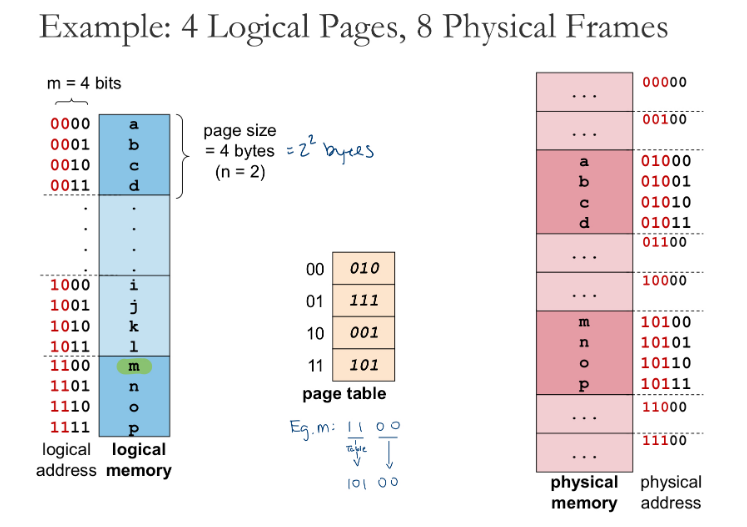
(picture taken from https://github.com/jasonqiu212/nus-cheatsheets/blob/main/CS2106/cs2106-final-cheatsheet.pdf)
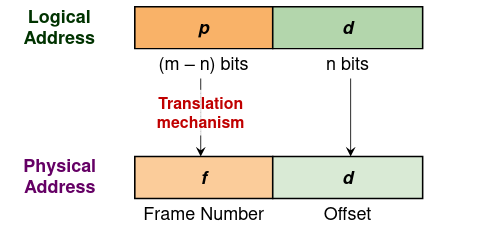
-
-
Hardware Support (TLB):
-
The Page Table is stored in RAM. Accessing it requires one memory cycle, then another for the actual data (2x slowdown).
-
TLB (Translation Look-aside Buffer): A small, ultra-fast hardware cache inside the CPU that stores recent Page Frame mappings.
-
Context Switch: The TLB contains process-specific mappings, so it must be flushed (cleared) when switching processes. (we are considering only single core processor)
(Optional: ) store TLB state into PCB, and restore it when continue.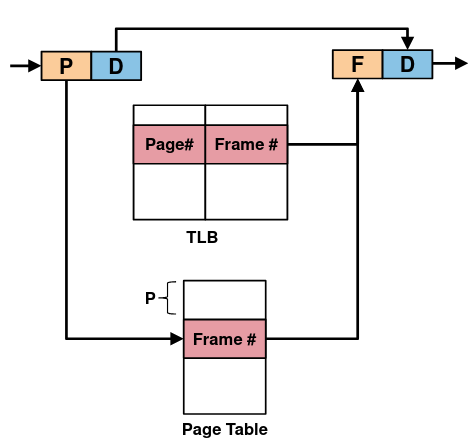
-
-
Protection:
- Valid/Invalid Bit: Indicates if a page is currently mapped in physical RAM. Prevent out-of-range access.
- Access Rights: Bits for Read, Write, Execute (RWX) permissions.
-
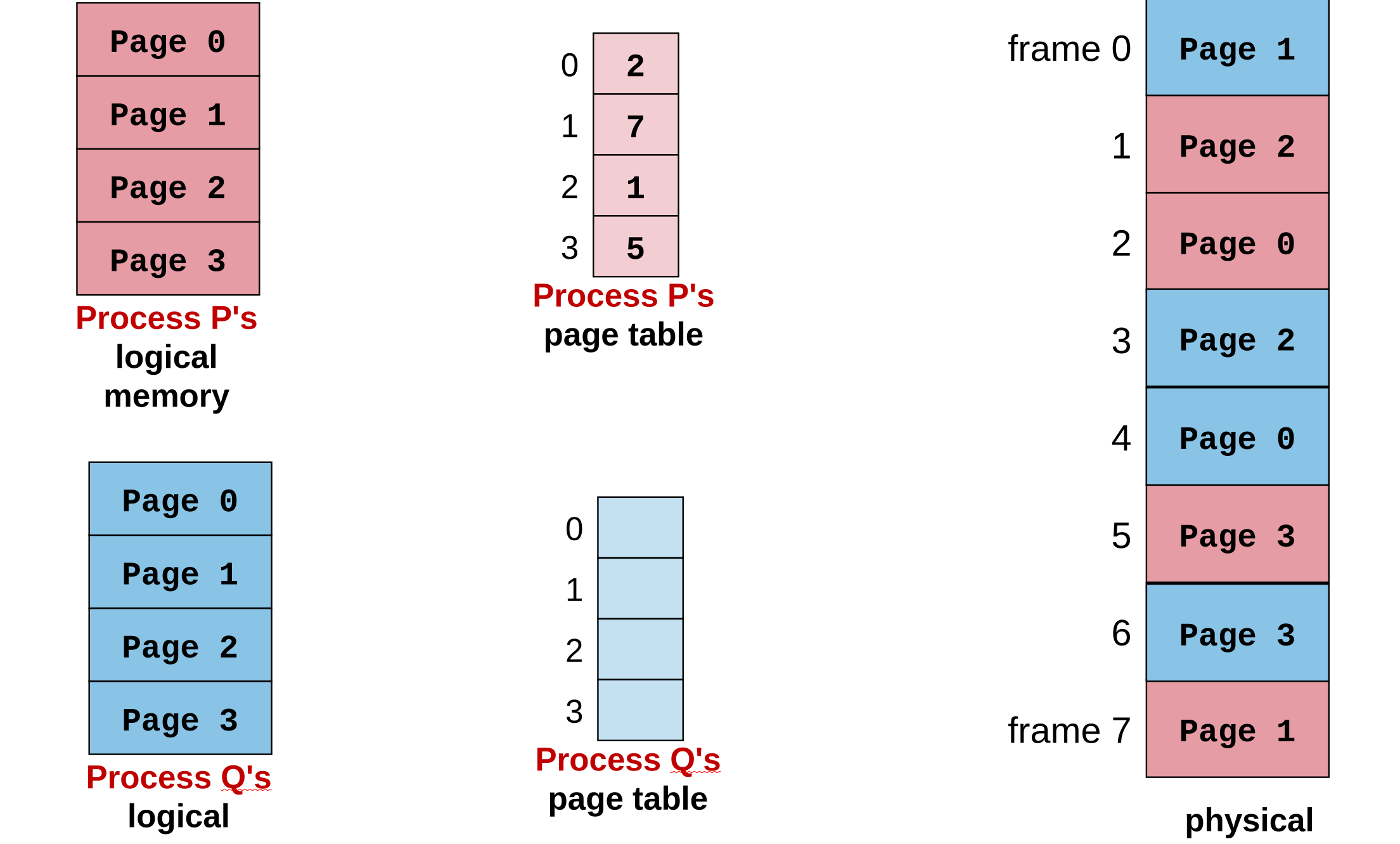
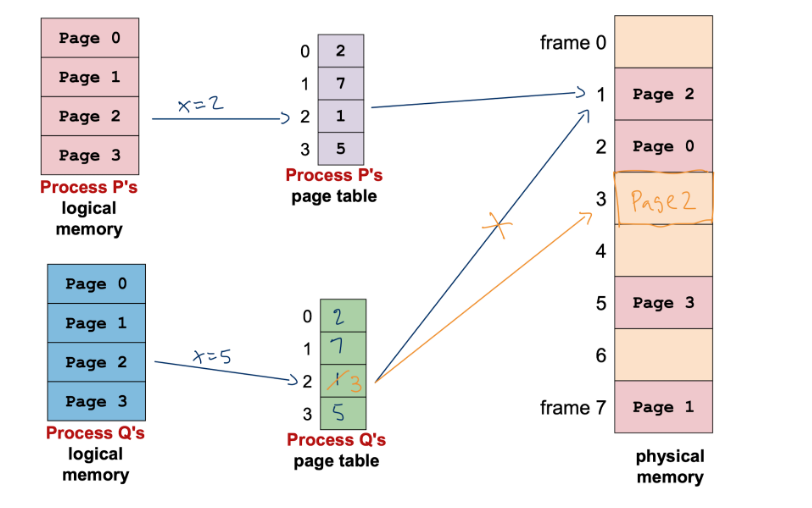
Shared Pages:
- Multiple processes can map different logical pages to the same physical frame.
- Used for shared code libraries (read-only) or inter-process communication.
- Copy on write. See the example below: initially P and Q are sharing the same physical frames. But we need to guarantee that when Q modify the variables, the variables in P should not change. So when we do midification, we will first duplicate the corresponding frame, and modify on the new frame.
2. Segmentation
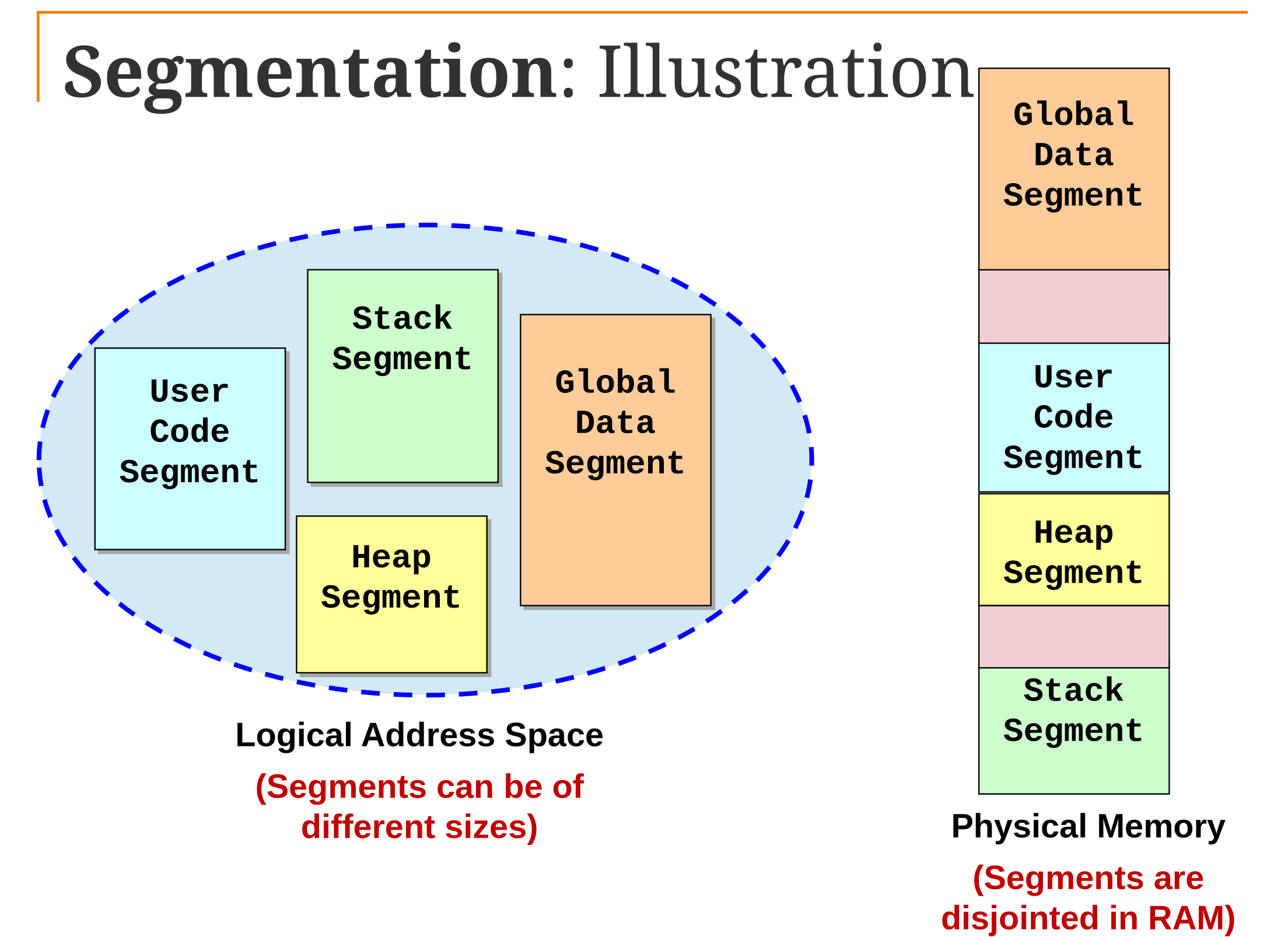
-
Basic Idea: Logical memory is viewed as a collection of Segments (logical units like "Main Code", "Stack", "Symbol Table") rather than a flat linear space.
-
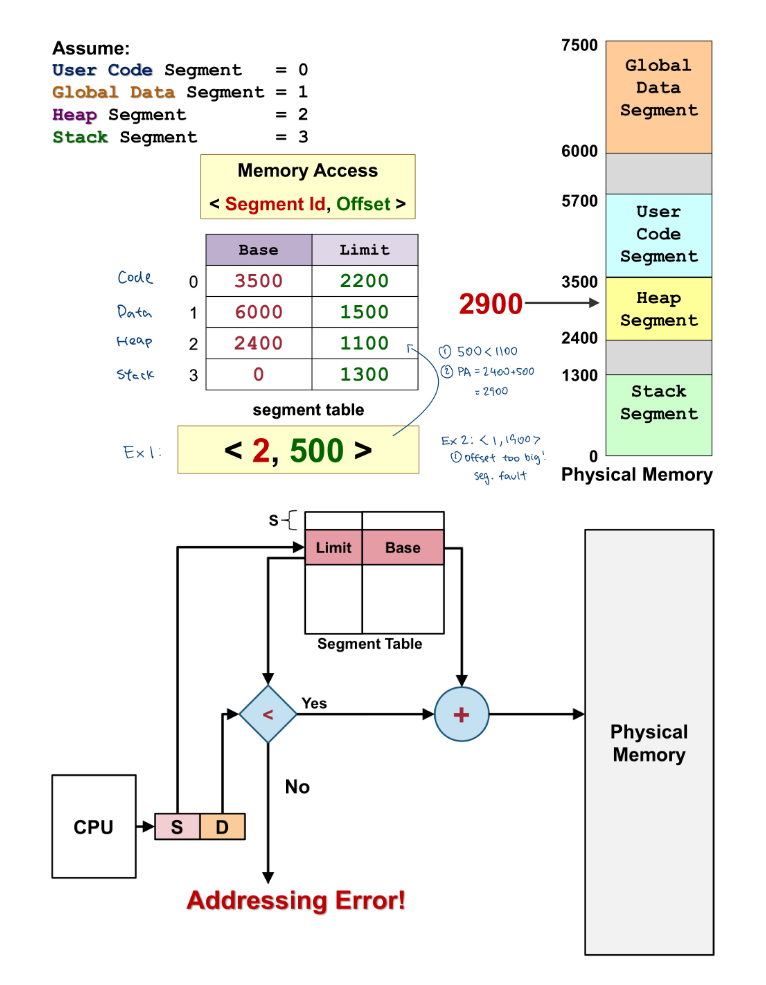
Address Translation:
-
Logical Address = Segment ID, Offset
-
Segment Table: Maps Segment ID Base Address, Limit.
-
Check: If , then .
-
-
Comparison:
- Paging: Invisible to programmer, eliminates external fragmentation, causes internal fragmentation.
- Segmentation: Visible to programmer, logical protection, causes external fragmentation (variable segment sizes).
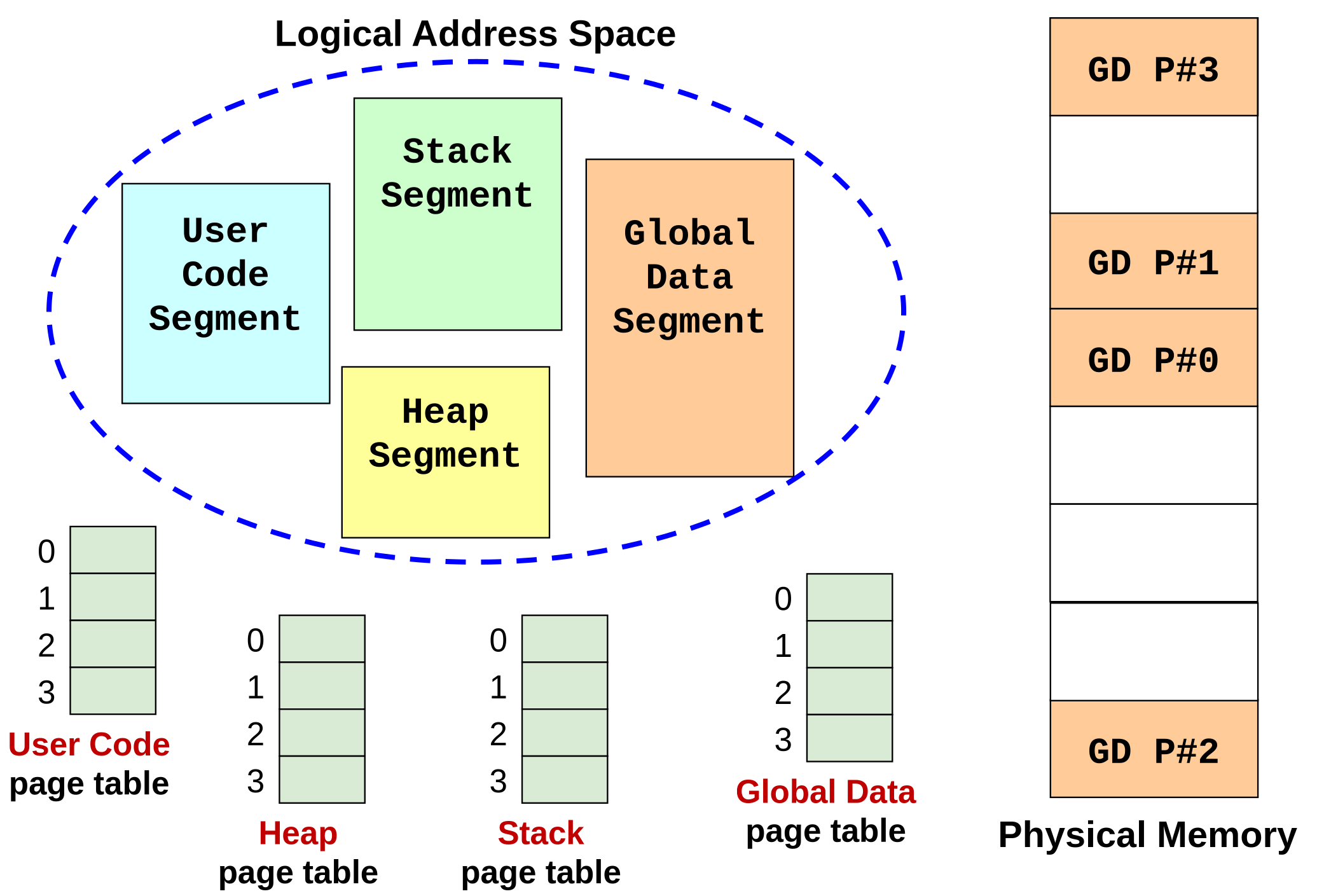
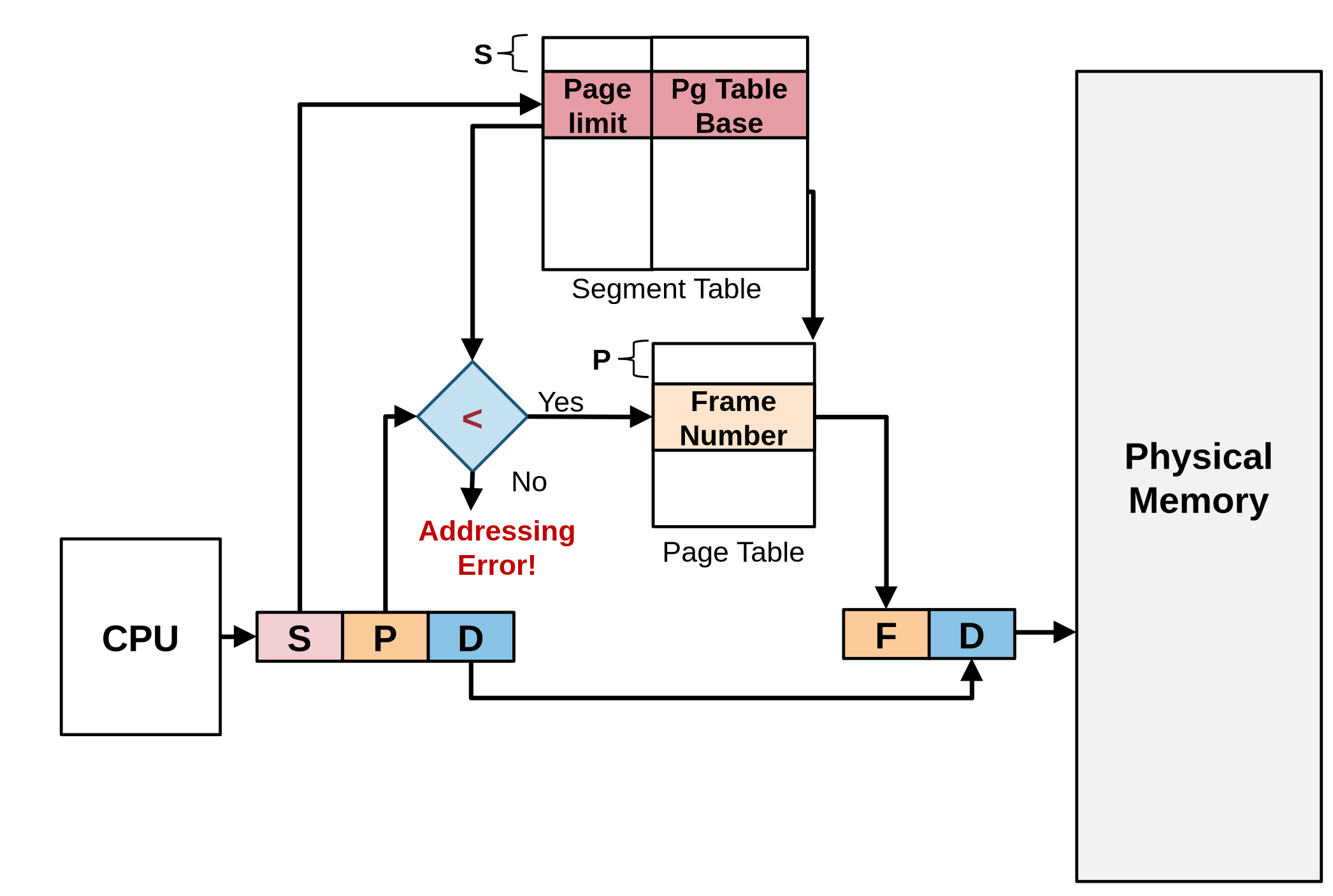
3. Segmentation with paging scheme
Paging solves external fragmentation; Segmentation ensures contiguous memory allocation. We can better manage our memory by combining them together.
Paging alone cannot guarantee contiguous logical address of memory.
Layer1 - Segment table: stores four entries(text, data, stack, heap)
Layer2 - Page table: stores page mapping.
9. Virtual Memory Management
1. Motivation & Mechanics
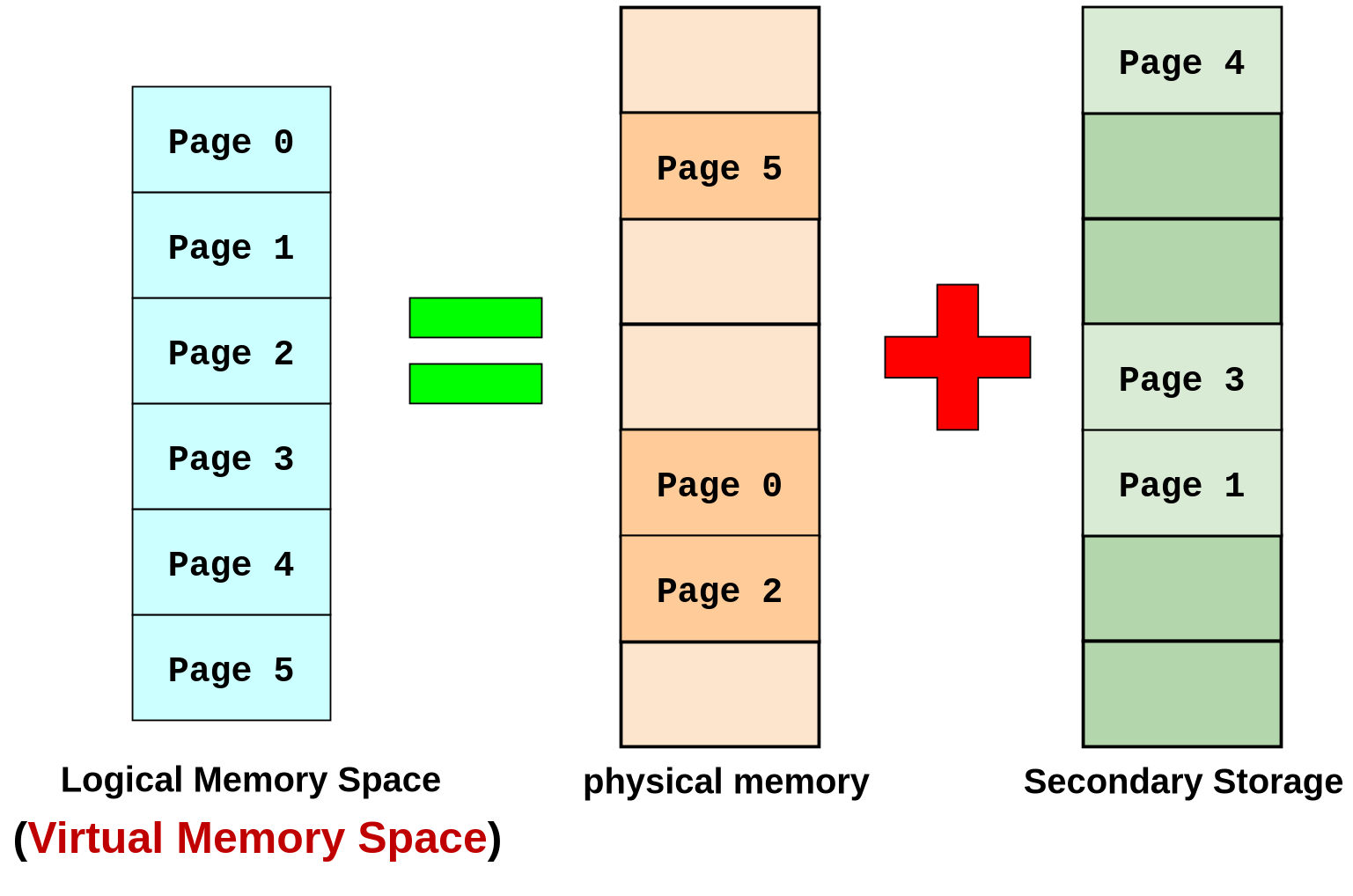
- Virtual Memory: Separates logical memory from physical memory completely. Allows execution of processes larger than physical RAM.
- Demand Paging: Pages are loaded into memory only when they are actually needed (lazy loading).
- Resident Bit: A bit in the Page Table Entry (PTE) indicating if the page is in RAM (1) or on Disk (0).
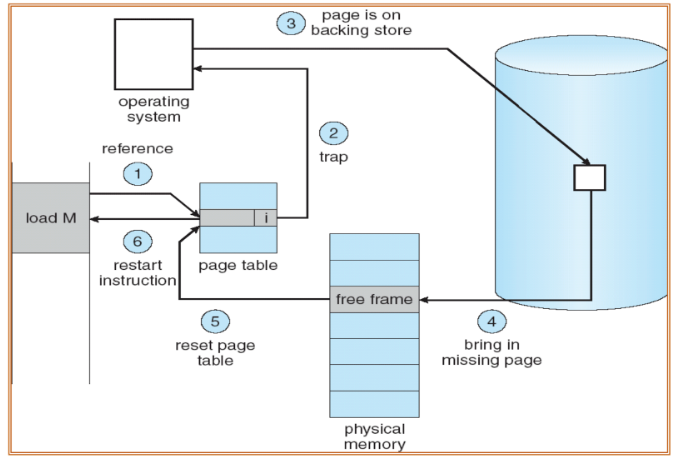
2. Handling a Page Fault
When the CPU accesses a page with Resident Bit = 0:
- Trap: Hardware generates a "Page Fault" trap to the OS.
- Save State: OS saves the registers and process state.
- Locate: OS finds the location of the missing page on the backing store (disk).
- Find Frame: OS finds a free physical frame. If none are free, it executes a Page Replacement Algorithm to evict a victim page.
- Load: Read the page from disk into the free frame (I/O operation, very slow).
- Update: Update the Page Table (set Frame #, set Valid bit = 1).
- Restart: The instruction that caused the fault is re-executed.
If memory access results in page fault most of the time == Thrashing
To avoid thrashing, we need to consider locality (temporal (time) & spatial):
Most programs exhibit these behaviors:
- Most time are spent on a relatively small part of code only
- In a time period, accesses are made to a relatively small part of data only.
3. Demand Paging
Demand Paging is the most common application of virtual memory. It follows a "lazy loading" strategy.
1. Motivation
- Startup Cost: When a new process is launched, loading all its text (code) and data pages into physical RAM immediately is inefficient and causes a large startup cost.
- Uncertain Usage: We often do not know in advance which pages a process will actually use. Loading unused pages wastes physical memory.
- Goal: By only loading what is needed, we reduce the footprint of the process in physical memory, allowing more processes to reside in memory simultaneously.
2. Basic Idea
- Lazy Loading: The process starts with no memory-resident pages (or very few). A page is never brought into physical memory until it is explicitly required by the CPU (i.e., when a page fault occurs).
3. Pros & Cons
- Pros:
- Fast Startup: Processes start running immediately without waiting for the whole program to load and initialize.
- Small Footprint: Only active pages consume physical RAM.
- Cons:
- Initial Sluggishness: As the process starts, it typically triggers multiple page faults to load the initial set of pages, which may make execution feel slow initially.
- Thrashing Risk: The page faults may have cascading effects on other processes (e.g., thrashing) if memory is over-committed.
4. Page Table Structures
For large address spaces (e.g., 64-bit), a single contiguous page table is too large.
-
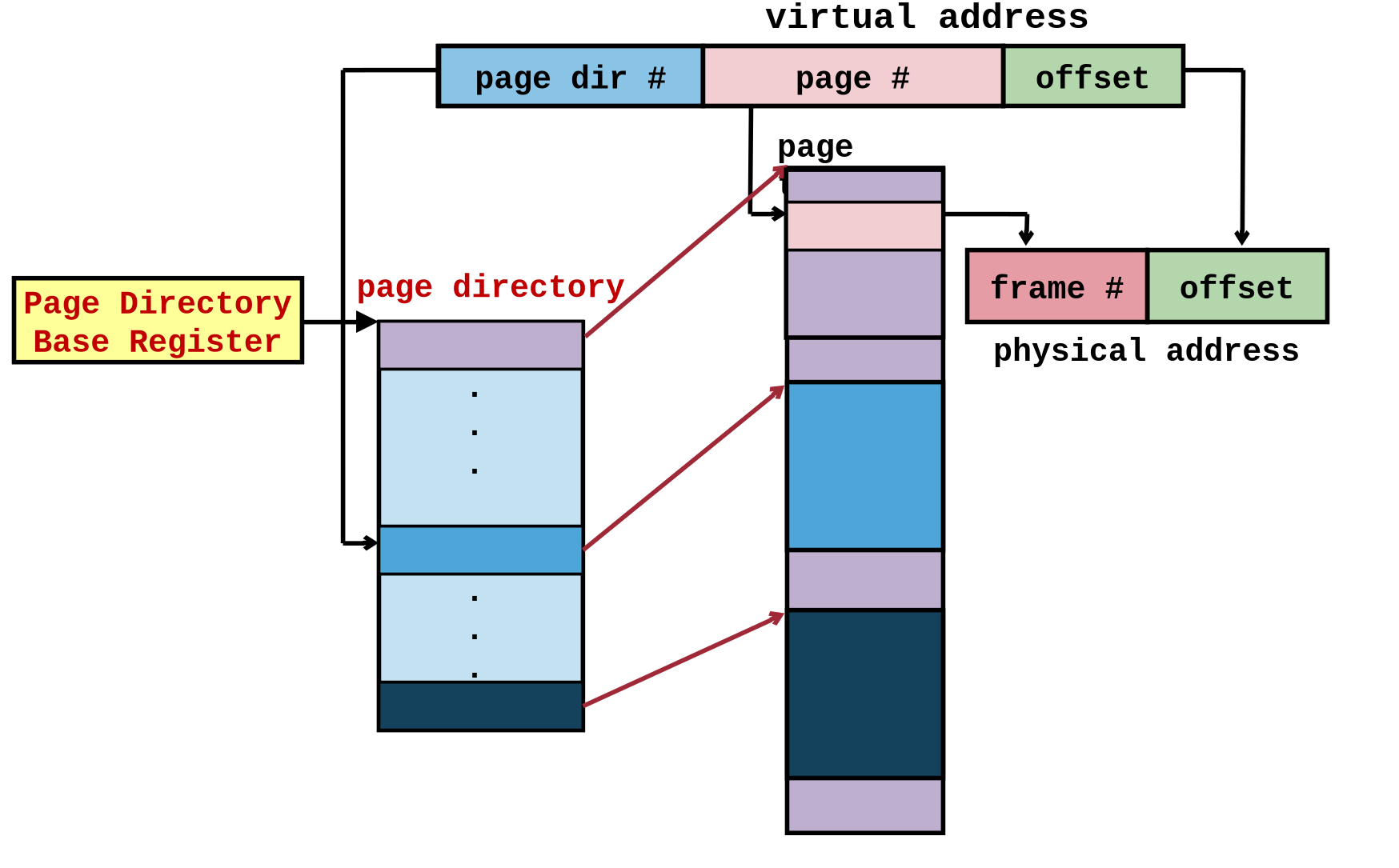
Hierarchical (2-Level) Paging: Breaks the page table into pieces. An outer "Page Directory" points to inner Page Tables. Only used tables are allocated in memory. (Although second level is also stored in memory, we will not create it when not used.)
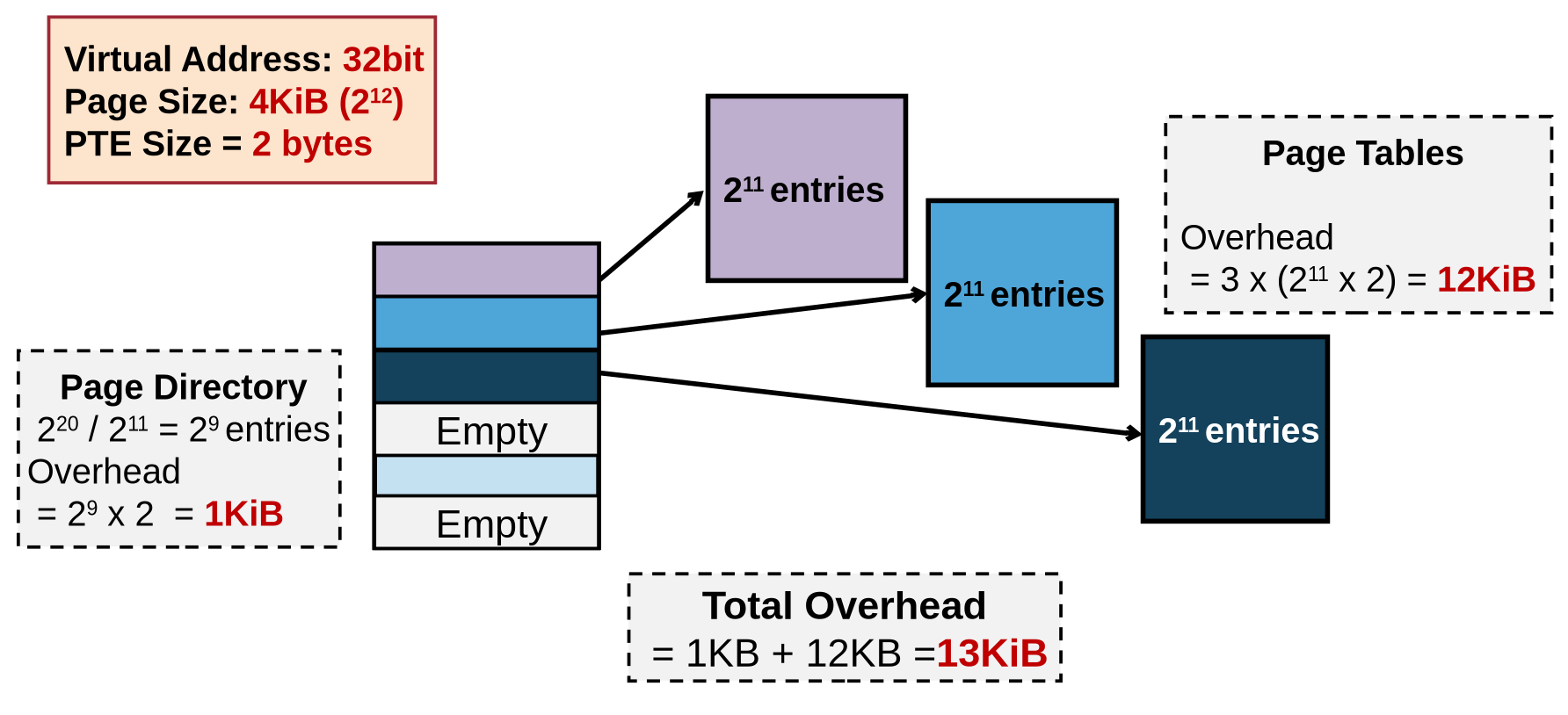
-
Inverted Page Table: The table scales with Physical RAM, not Virtual Address space. It has one entry per physical frame, storing the PID and Page #. Hard to search (requires hashing).
map<frame, page>, in situation where # frame << # page, it significantly shrinks memory usage of page table.
4. Page Replacement Algorithms
When memory is full, which page should be evicted? We want to reduce the total number of page faults.
-
Optimal (OPT): Replace the page that will not be used for the longest time in the future. Impossible to implement; used as a benchmark.
-
FIFO (First-In-First-Out): Replace the oldest page.
-
Belady’s Anomaly: For FIFO, adding more physical frames can surprisingly increase the number of page faults.
-
-
LRU (Least Recently Used): Replace the page that hasn't been used for the longest time.
- Good approximation of OPT.
- Implementation: Hard. Requires updating a timestamp or moving a stack node on every memory access.
-
Second Chance (Clock Algorithm): A practical approximation of LRU.
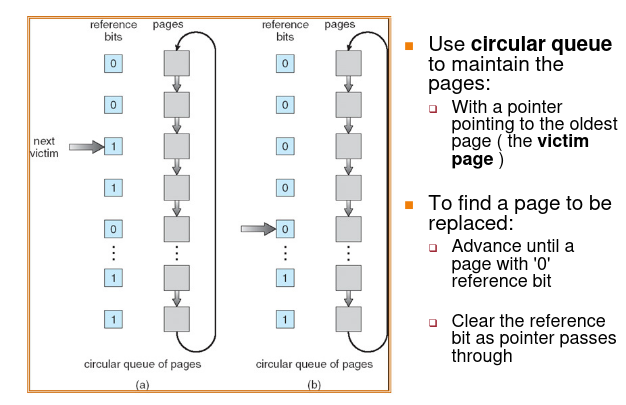
- Uses a Reference Bit in the PTE (set to 1 by hardware when referenced).
- Pages are arranged in a circular queue.
- The pointer sweeps through pages:
- If Ref Bit == 1: Set it to 0 (give it a "second chance") and move to next.
- If Ref Bit == 0: Evict this page.
5. Frame Allocation & Thrashing
1. Allocation Policies:
- Local Replacement: A process only replaces its own pages.
- Pros: Stable performance
- Cons: If frame allocated is not enough, may hinder the progress of a process.
- Global Replacement: A process can steal frames from others.
- Pros: Allow self-adjustment between processes
- Cons: Badly behave process can affect others
2. Thrashing:
-
If local replacement is used:
-
Thrashing can be limited to one process
-
But that single process can hog the I/O and degrades the performance of other processes
-
-
If global replacement is used:
-
A thrashing process "steals" page from other process
-
cause other process to thrash (Cascading Thrashing)
-
3. Working Set Model:
Basic idea: we need to find the appropriate number of pages allocated to a process. This number is dynamic over running time.
- Based on the Locality Principle (processes use a cluster of pages together).
- Working Set: The set of pages used in the last time units.
- To prevent thrashing, the OS must ensure every active process has enough frames to hold its current Working Set.
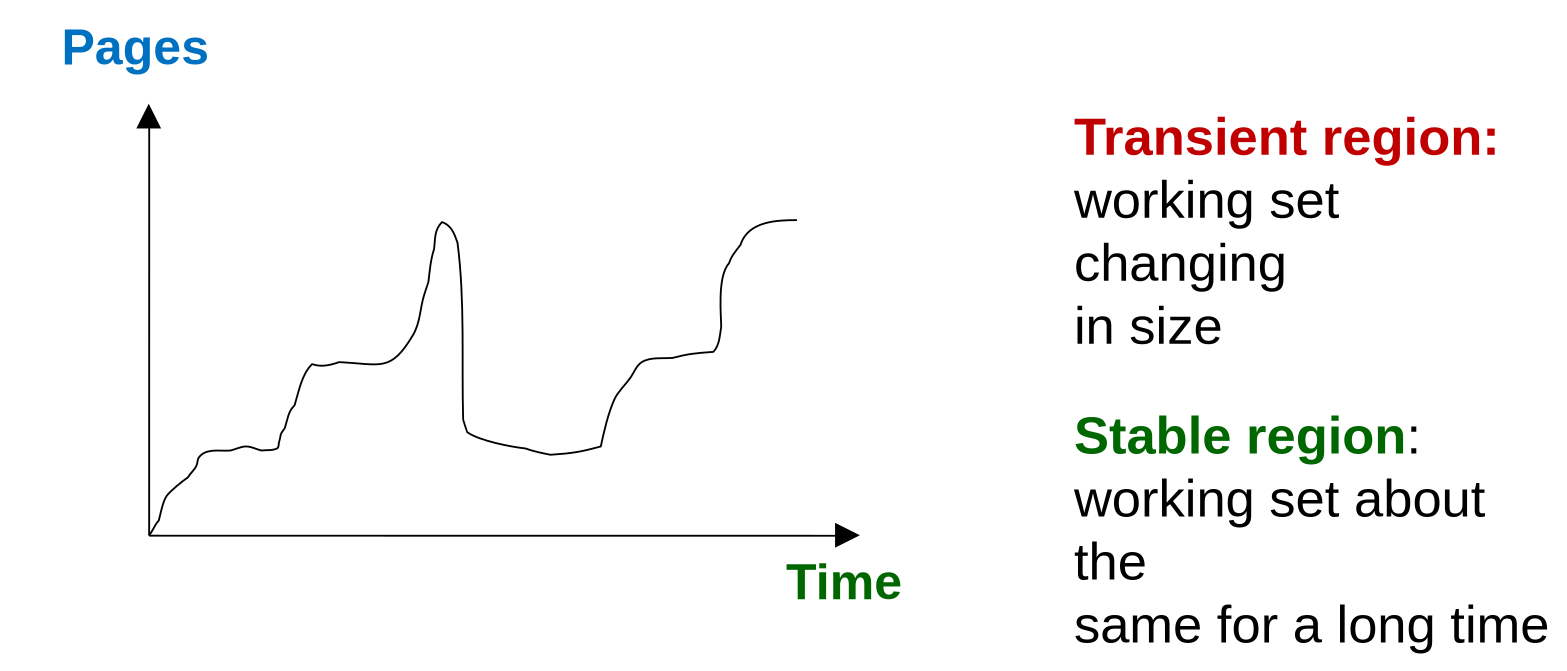
- Accuracy of working set model is directly affected by the choice of
- Too small: May miss pages in the current locality
- Too big: May contains pages from different locality
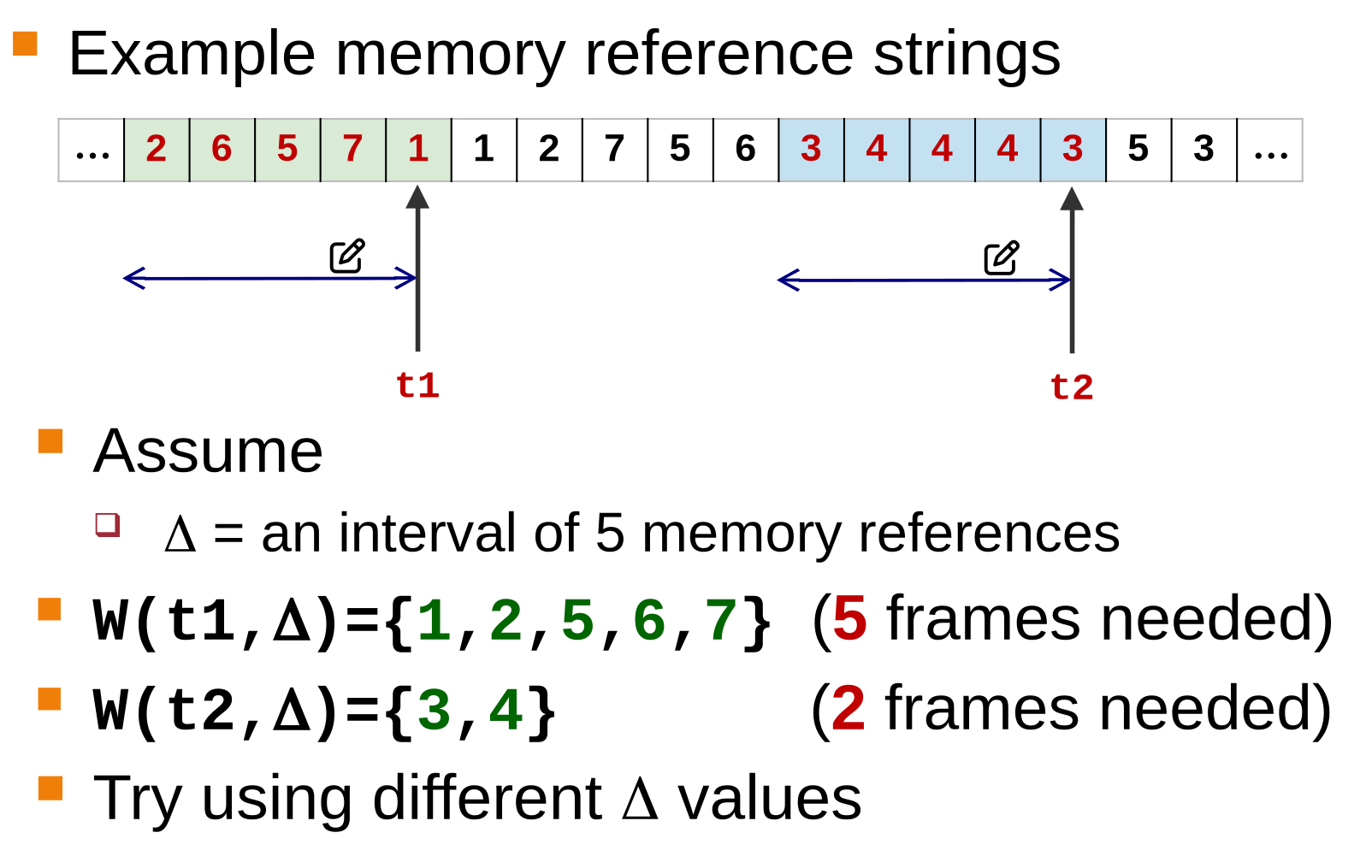
In practice, we count the number of distinct pages periodically, instead of keeping track all the time.
10. File System Management
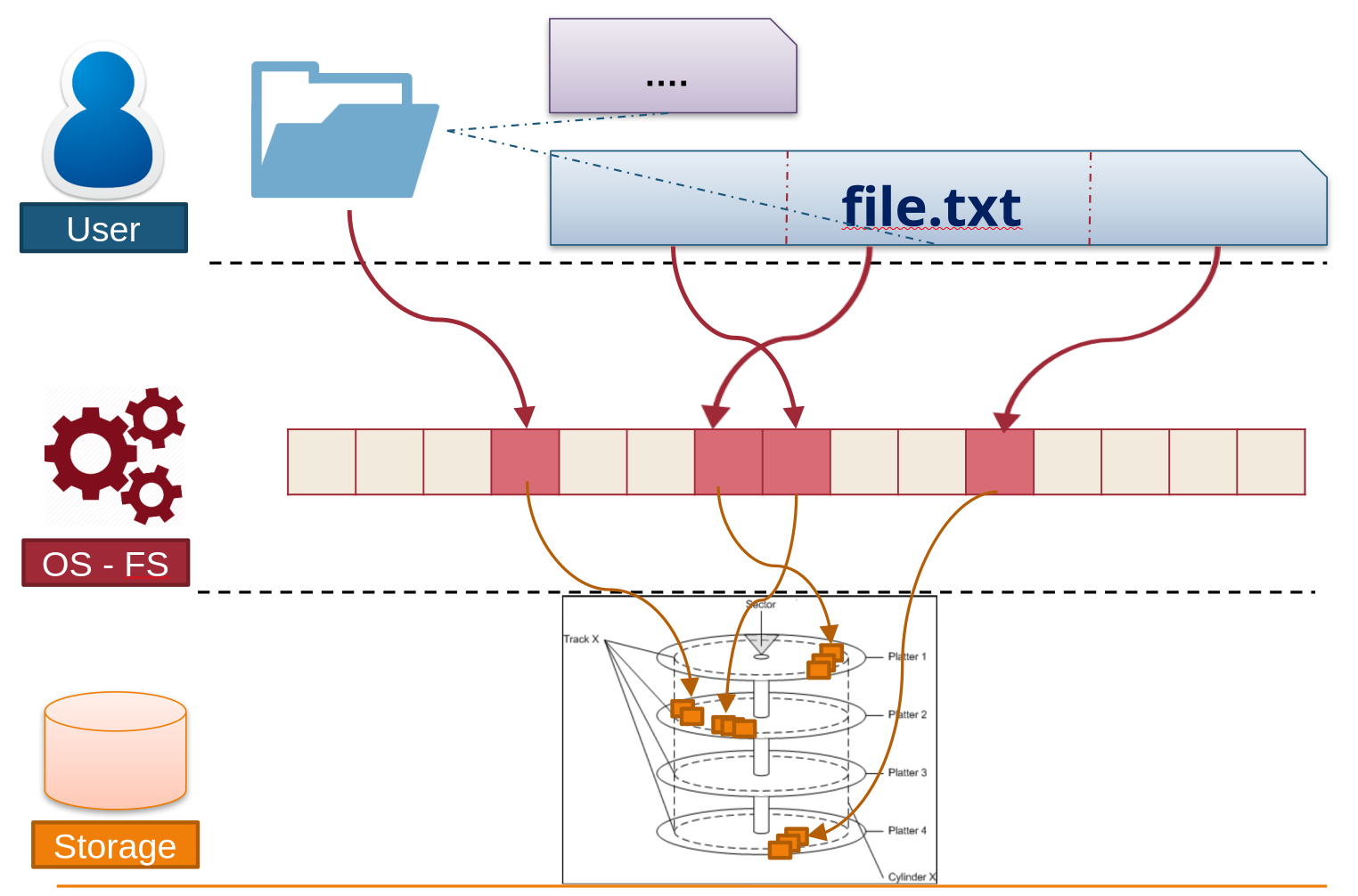
1. Introduction and Motivation
1. Motivation
- Persistence: Physical memory (RAM) is volatile. External storage (Disk/SSD) is needed to store data persistently beyond the lifetime of the OS or processes.
- Abstraction: Direct access to storage hardware is complex and varies by device. The File System (FS) provides a logical view (files and directories) to hide hardware details.
- Efficiency & Protection: The FS manages free/used space efficienty and provides protection mechanisms (permissions) for data sharing.
2. Basics
- File: A logical unit of information created by a process. It is an abstract data type.
- Directory: A logical grouping of files (folders), but essentially is also a file.
- Metadata: Information describing the file (e.g., name, size, owner, permissions), usually stored separately from the actual data.
3. Hard Disk layout
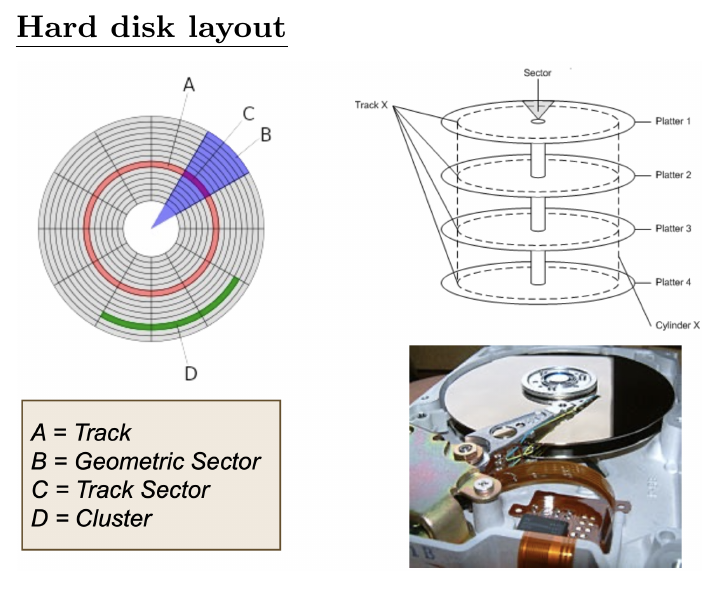
- Track: A track is one of the concentric circular rings on the surface of a hard disk platter. To access a specific track, the disk arm must physically move the read/write head to the correct radius, a process known as "seeking".
- Track Sector (Sector): A sector is a specific segment or subdivision within a single track. It represents the smallest accessible physical storage unit on the disk hardware (typically sized between 512 bytes and 4KB). Accessing a specific sector requires waiting for the disk platter to rotate the sector under the disk head (Rotational Latency).
- Cluster: A cluster is a logical software concept used by the File System (not the hardware). It groups a set of contiguous disk blocks (or sectors) together. It serves as the smallest unit of space allocation for files to reduce bookkeeping overhead, though it may lead to internal fragmentation.
2. File Concepts
1. File Attributes (Metadata)
- Name: Human-readable reference.
- Identifier: Unique tag (number) used internally by the FS.
- Type: Indicates the nature of the file (e.g., text, binary, executable).
- Size: Current size (bytes, words, or blocks).
- Protection: Access control data (Read, Write, Execute).
- Time/Date/User: Creation, modification timestamps, and owner ID.
2. File Types
- Regular Files: Contain user info.
- ASCII: Text files, source code (readable).
- Binary: Executables, images, zip files (require specific programs to read).
- Directories: System files maintaining FS structure.
- Special Files: Character or block-oriented files (hardware interaction).
3. Access Methods
- Sequential Access: Reading bytes in order (cannot skip). Used by magnetic tapes.
- Random Access: Can read/write at any position using
seekor explicit offsets. - Direct access: like (and based on) random access, but for fixed-length records (e.g. in database)
4. File Operations (System Calls)
- Create/Delete: Manage file existence.
- Open: Prepares file for access; loads metadata into the Open File Table.
- Close: Frees resources.
- Read/Write: Data transfer.
- Seek: Repositions the file pointer.
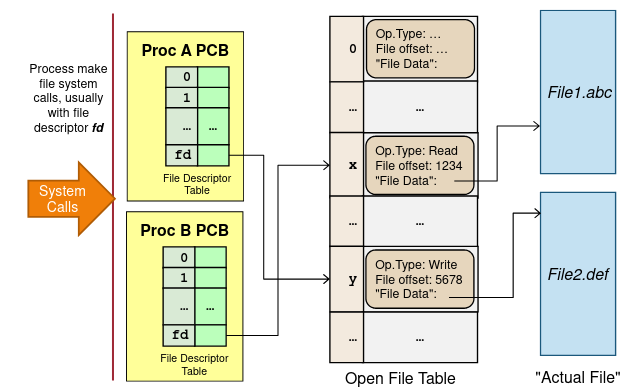
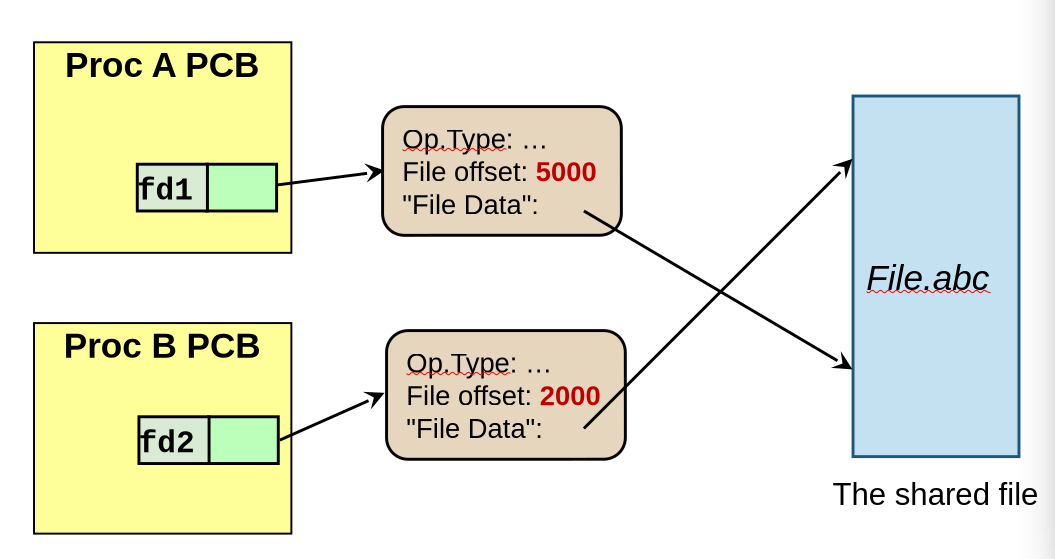
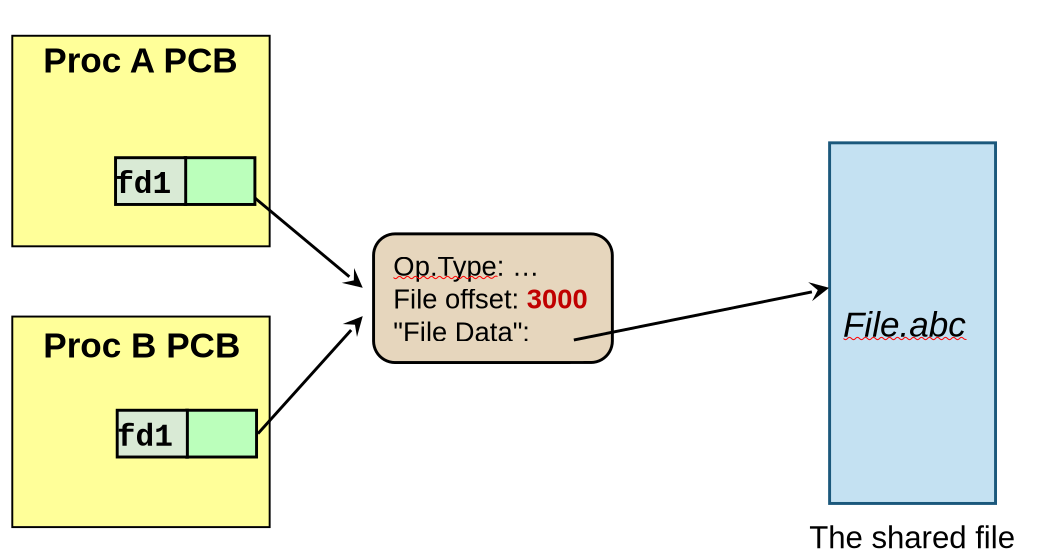
5. Open File Tables
To manage open files, the OS maintains two levels of tables:
- System-wide Open-file Table (In-memory Inode Table): One entry per file (contains file locks, disk location).
- Per-process Open-file Table: Points to the system-wide table; maintains the current file offset (pointer) specific to that process.
3. Directory Structure
1. Organizations
-
Single-Level: All files in one directory (naming collisions frequent).
-
Tree-Structured: Hierarchical. Most common. Allows grouping.
- Absolute Path: Path from root (e.g.,
/home/user/file). - Relative Path: Path from Current Working Directory (e.g.,
./file).
- Absolute Path: Path from root (e.g.,
-
DAG (Directed Acyclic Graph): Allows sharing files/subdirectories.
- Implementation: Hard Links (Unix
ln) or Symbolic Links (Unixln -s).
- Implementation: Hard Links (Unix
-
General Graph
- Structure: Allows cycles (e.g., a subdirectory linking back to its parent).
- Issues:
- Traversal: Hard to traverse without falling into infinite loops.
- Deletion: Difficult to determine when to garbage collect files (a cycle of directories might have non-zero reference counts but be unreachable from the root).
2. Links in Unix
- Hard Link: Multiple directory entries point to the same actual file data (same inode). The file is only deleted when the reference count reaches zero. Limited to files (not directories) and same partition.
- Symbolic (Soft) Link: A special file containing the path to another file. If the target is deleted, the link becomes invalid ("dangling pointer"). Can link across partitions.
3. Directory Implementation (System View)
This describes how the OS stores the directory information (the list of files) on the disk.
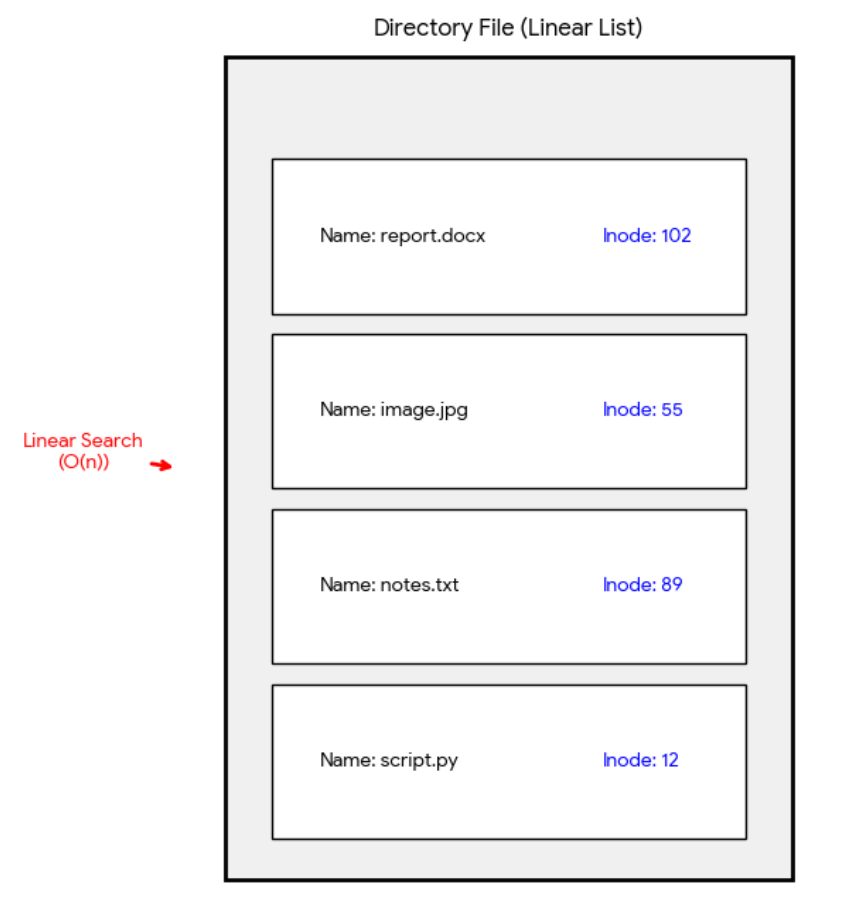
1. Linear List
- Method: The directory is simply a list of entries, where each entry contains the File Name and metadata (or a pointer to metadata).
- Performance:
- Simple to program.
- Slow Lookup: Finding a specific file requires a linear search, which becomes inefficient for directories containing many files.
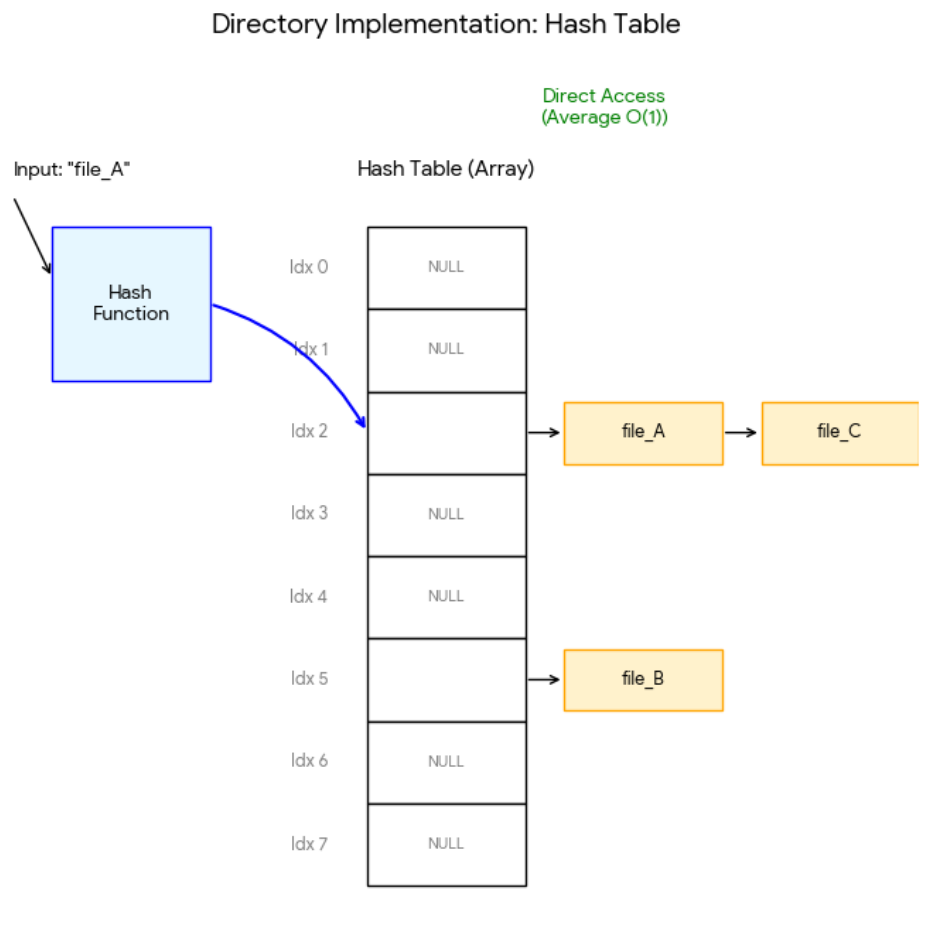
2. Hash Table
- Method: A linear list combined with a hash data structure. The filename is hashed to an index to locate the entry.
- Performance:
- Fast Lookup: Search time is constant.
- Issues: Hash tables have a fixed size (limiting the number of entries or requiring resizing); requires collision resolution mechanisms (e.g., chaining).
4. File System Implementation (Disk Layout)
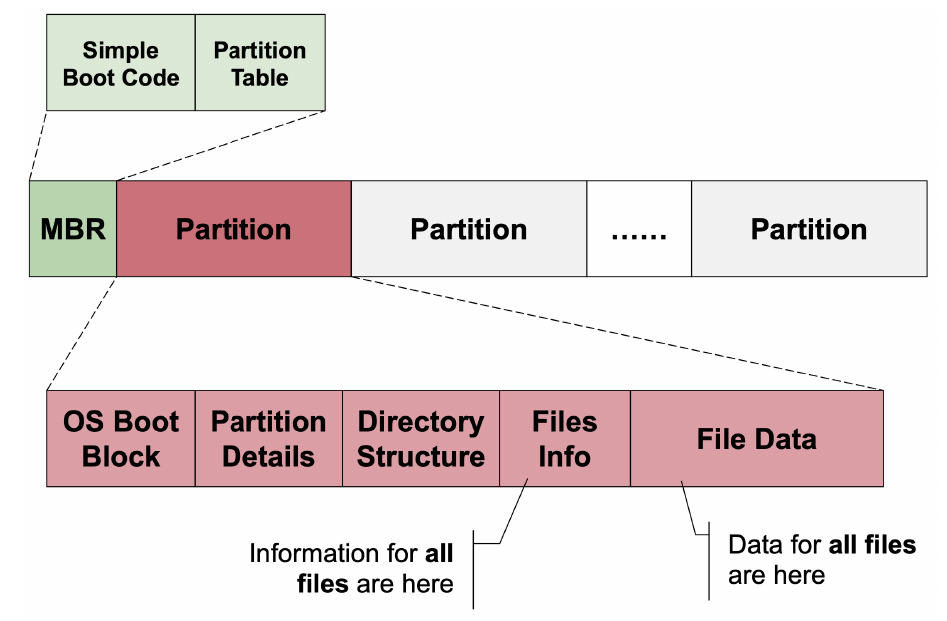
1. Disk Organization
-
MBR (Master Boot Record): Sector 0, contains the partition table and boot code.
-
Partitions: Independent sections of the disk, each holding a file system.
-
Logical Blocks: The smallest accessible unit by the FS (e.g., 4KB). Mapped to physical disk sectors.
2. Allocation Methods (Storing files on disk)
-
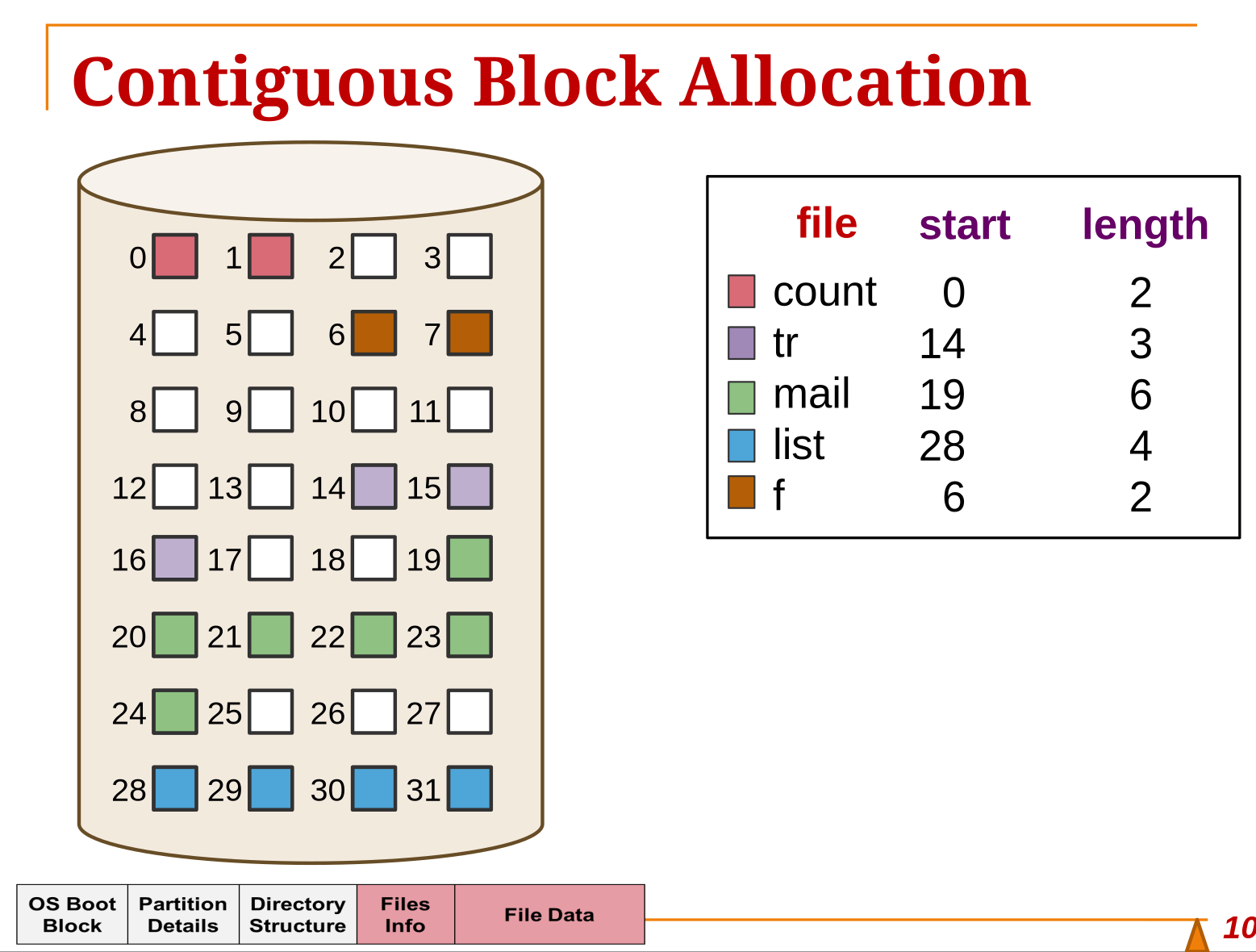
Contiguous Allocation:
-
Concept: File occupies a set of consecutive blocks.
-
Pros: Fast access (minimal seek time), simple (only need start block + length).
-
Cons: External Fragmentation (free space chopped up), difficult to grow files.
-
-
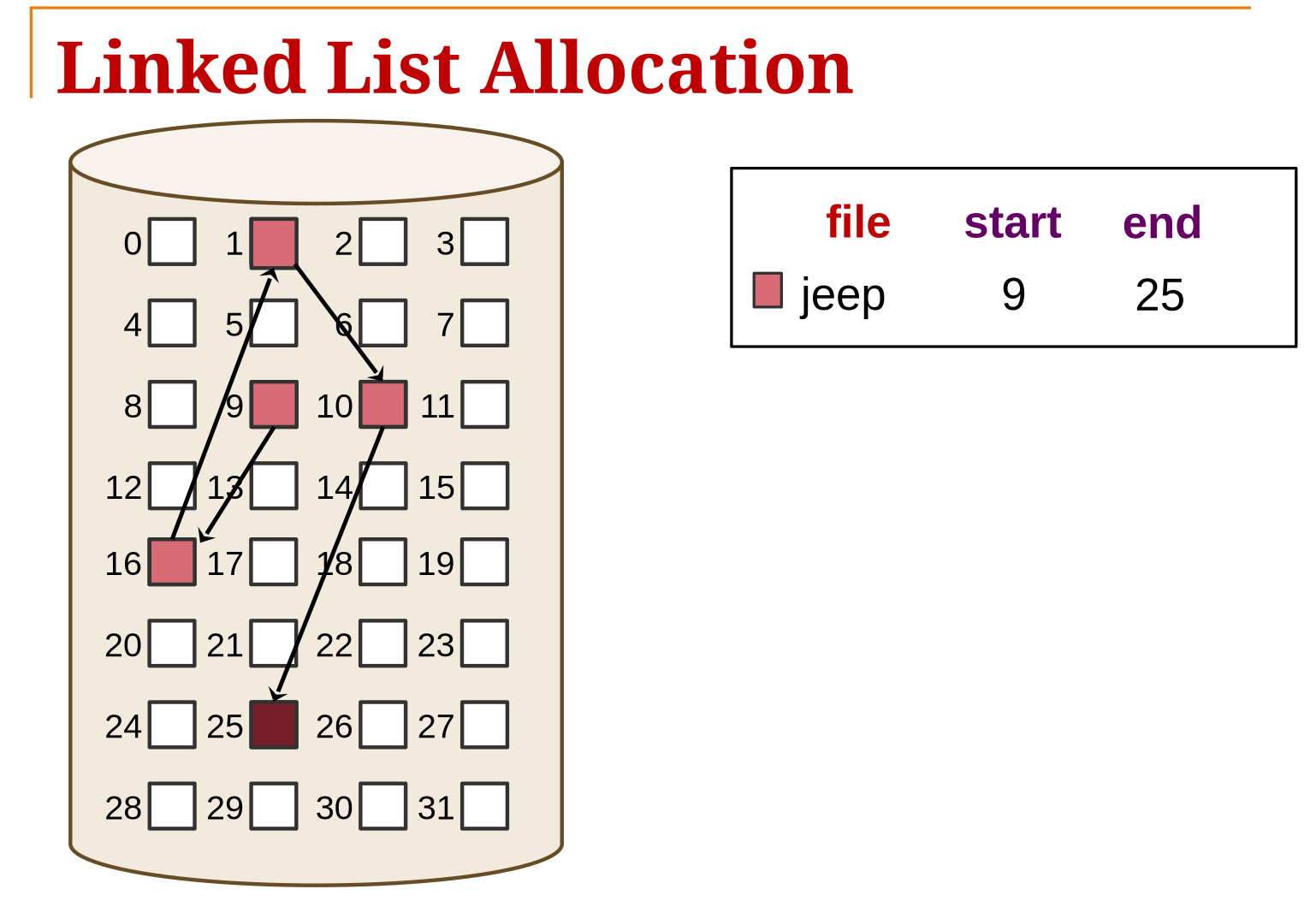
Linked List Allocation:
-
Concept: Each block contains a pointer to the next block.
-
Pros: No external fragmentation.
-
Cons: Slow random access (must traverse list), storage overhead for pointers, reliability issues (broken link loses data).
-
-
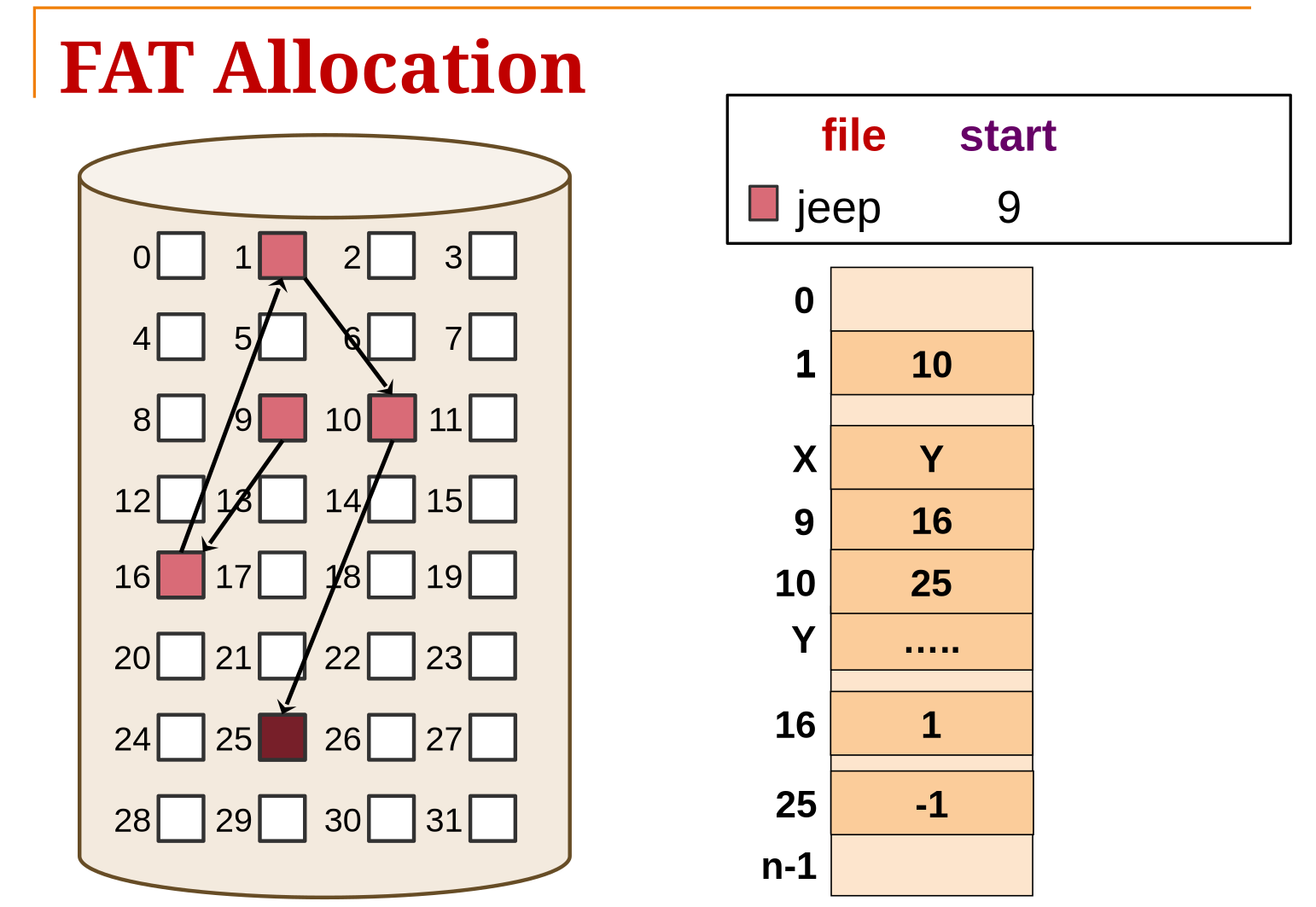
FAT (File Allocation Table):
-
Concept: Moves the linked list pointers out of the data blocks and into a dedicated table in memory (RAM).
-
Pros: Faster random access than pure linked list (traversal happens in memory).
-
Cons: The table can get very large for large disks, consuming RAM.
-
-
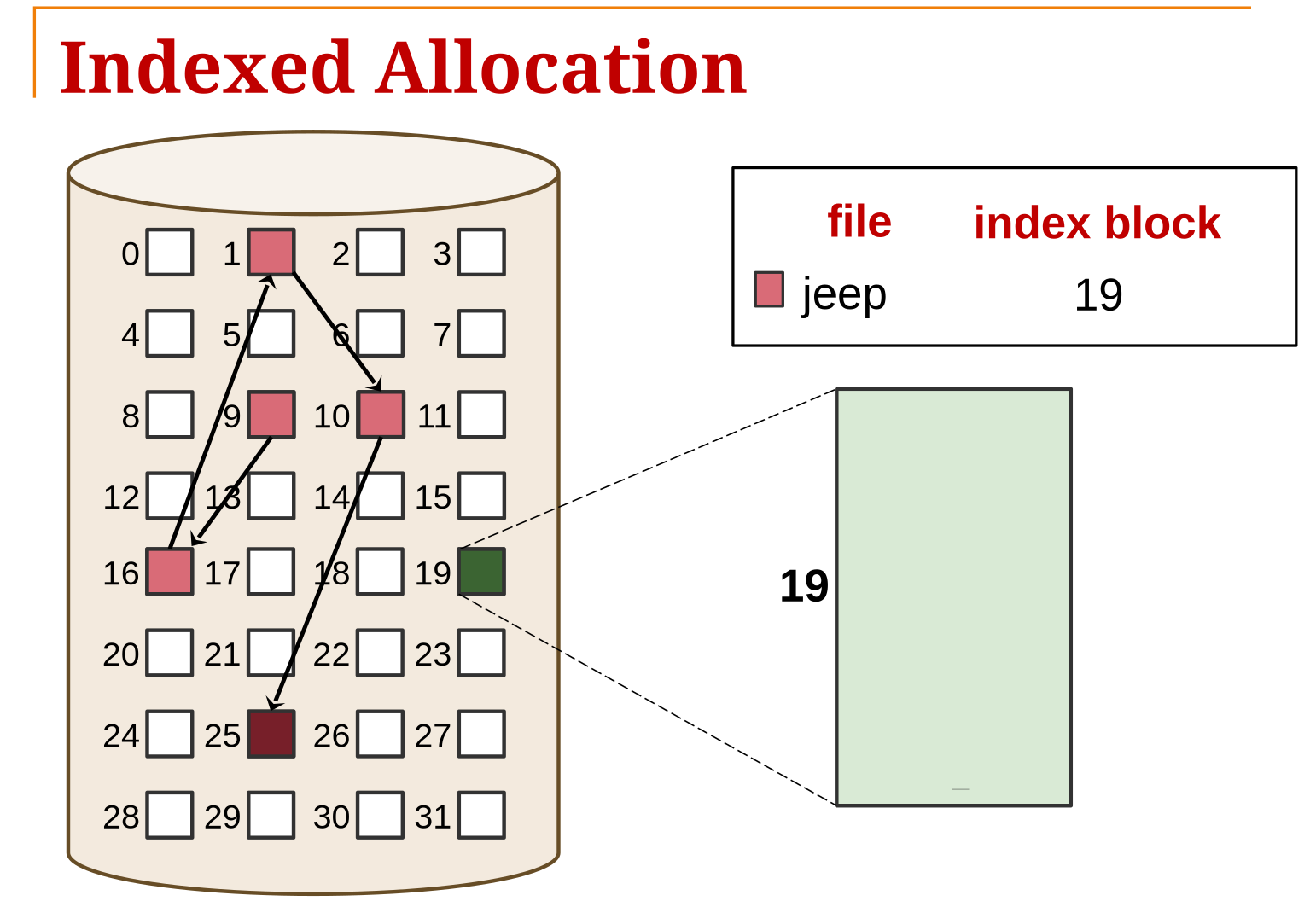
Indexed Allocation (Unix style):
-
Concept: An Index Block (or I-Node) holds an array of pointers to data blocks.
-
Pros: Fast random access, no external fragmentation.
-
Cons: Overhead of index blocks.
-
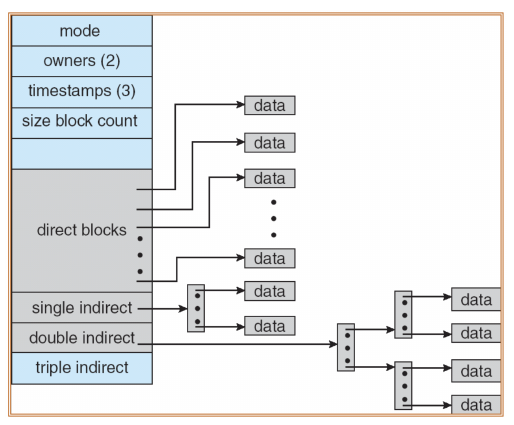
Handling Large Files: Uses Multi-level Indexing (Direct blocks, Single Indirect, Double Indirect, Triple Indirect pointers).
In this diagram, the leftmost block is Inode, which specifies where the data is stored. The extension block is index block.
-
5. Free Space Management
How does the OS know which blocks are empty?
-
Bitmap (Bit Vector):
- Each block is represented by 1 bit (1=Occupied, 0=Free).
- Pros: Easy to find contiguous free space.
- Cons: Requires memory to store the bitmap.
- Implementation: Find a space, store 001000111001011...
-
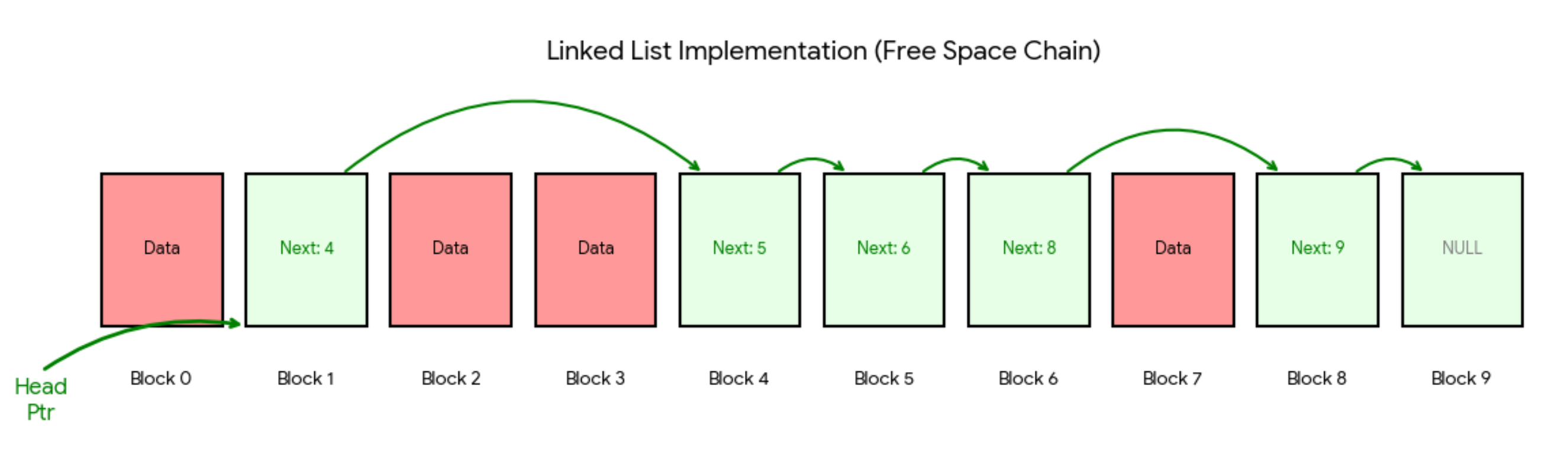
Linked List:
-
A linked list connects all free blocks.
-
Pros: No extra space needed (pointers stored in free blocks).
-
Cons: Hard to find contiguous space; traversing is slow.
-
(NOT COVERED YET, WILL FIX LATER)
6. Disk Scheduling (Brief Overview)
To optimize performance (reduce seek time), the OS schedules I/O requests:
- FCFS (First-Come, First-Served): Simple, but can result in wild head movements.
- SSF (Shortest Seek First): Serves request closest to current head position. Efficient but can cause starvation for distant tracks.
- SCAN (Elevator): Head moves end-to-end, servicing requests along the way.
- C-SCAN (Circular SCAN): Like SCAN, but only services requests in one direction (e.g., 0 to end), then snaps back to 0 without reading. Provides more uniform wait times.
VI. Case Study 1: Microsoft FAT (File Allocation Table)
1. Structure
- Boot Sector -> FAT Table (duplicated for backup) -> Root Directory -> Data Blocks.
2. Key Mechanisms
- The FAT: A table where index
kcorresponds to data blockk. The entry contains the index of the next block in the file, or special codes likeEOF(End of File),FREE, orBAD. - Directory Entry: Stores the File Name (8.3 format), Attributes, First Disk Block Number, and Size.
- Operation: To read a file, the OS reads the "First Block" from the directory entry, then consults the FAT table to follow the chain of blocks.
3. Variants
- FAT12/FAT16/FAT32: Numbers indicate the number of bits used for block addresses. FAT32 supports larger partitions but uses clusters (groups of blocks) to manage size, leading to Internal Fragmentation.
VII. Case Study 2: Linux Ext2 (Extended-2)
1. Structure
- Disk is divided into Block Groups.
- Superblock: Describes the whole FS (total size, inode count).
- Group Descriptors: Describes the block group (free bitmaps location).
- Bitmaps: One for blocks, one for Inodes.
- I-Node Table: Stores the actual Inodes.
- Data Blocks: Stores file content.
2. The I-Node (Index Node)
- Every file corresponds to exactly one I-Node.
- Contains: Mode (permissions), Owner, Size, Timestamps, Reference Count (for hard links), and Data Block Pointers.
- Pointers:
- 12 Direct Pointers (to data).
- 1 Single Indirect (points to a block of pointers).
- 1 Double Indirect.
- 1 Triple Indirect.
- Note: The Filename is NOT stored in the I-Node; it is stored in the Directory Entry.
3. Directory Implementation
- A directory is a file containing a list of entries.
- Entry Format:
[Inode Number] | [Record Length] | [Name Length] | [File Name]. - Lookup: To find
/home/user, FS finds Inode for/(root), reads its data to find entry "home", gets Inode for "home", reads its data to find "user".
final take-away
-
Logical memory is not generated by the operating system, it is generated by your program and compiler. However, it cannot randomly access virtual memory as well, because it needs to apply for the memory before using it.
-
Stack and heap will never clash in 64-bit machine because its logical memory has 17 billion GB. And the physical frames are dynamically allocated, so it will always have enough memory to use.
-
Programmers don't need to care about the segments,the compiler will manage it for us.
-
TLB to page table in memory is like cache to memory.
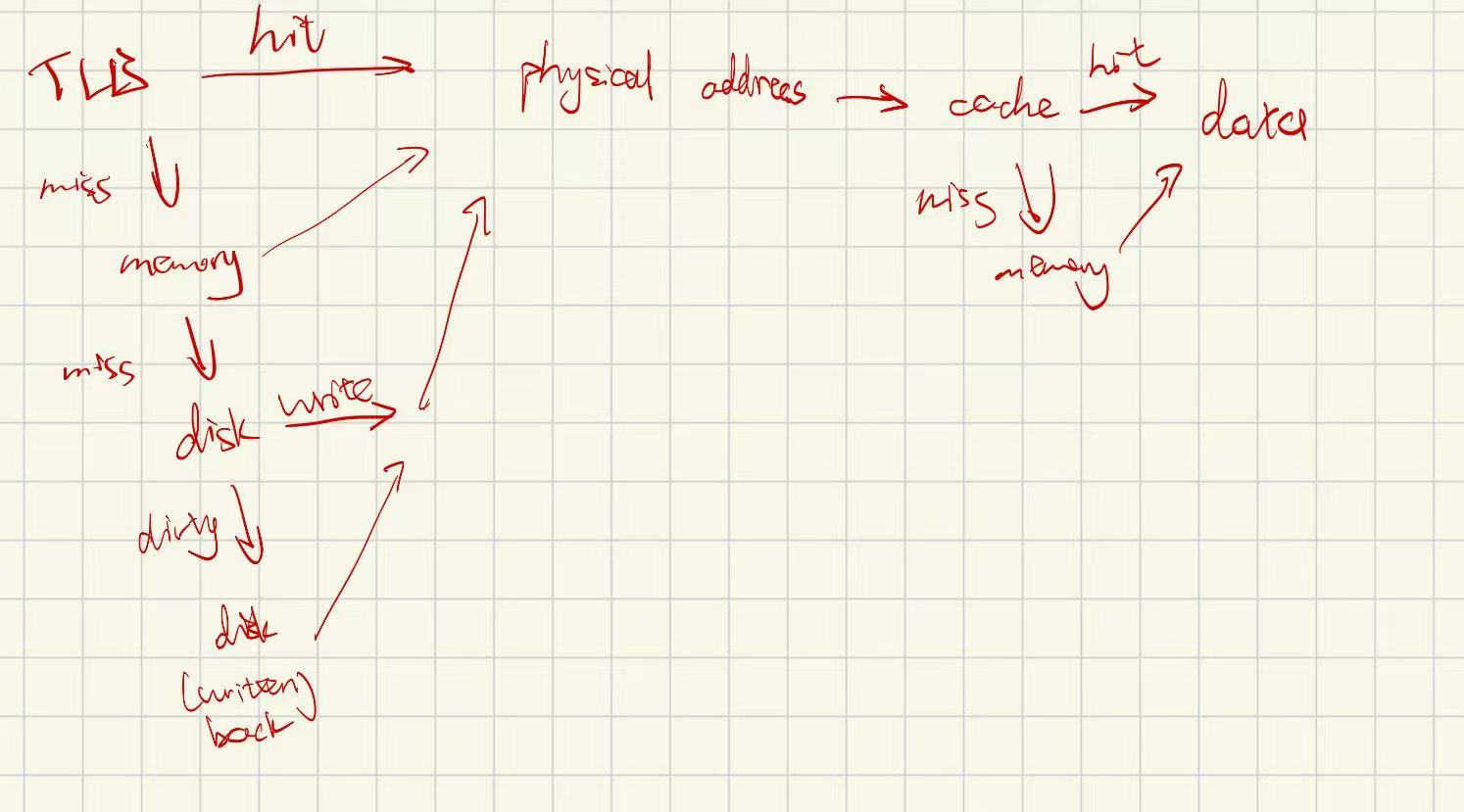
-
page has page replacement policy; page table also has its replacement policy
-
MLFQ is not suited for real-time and multimedia apps, because it will mistake them as CPU-bound, and lower their priority.
-
inode multi-level indirect blocks are stored in disk.
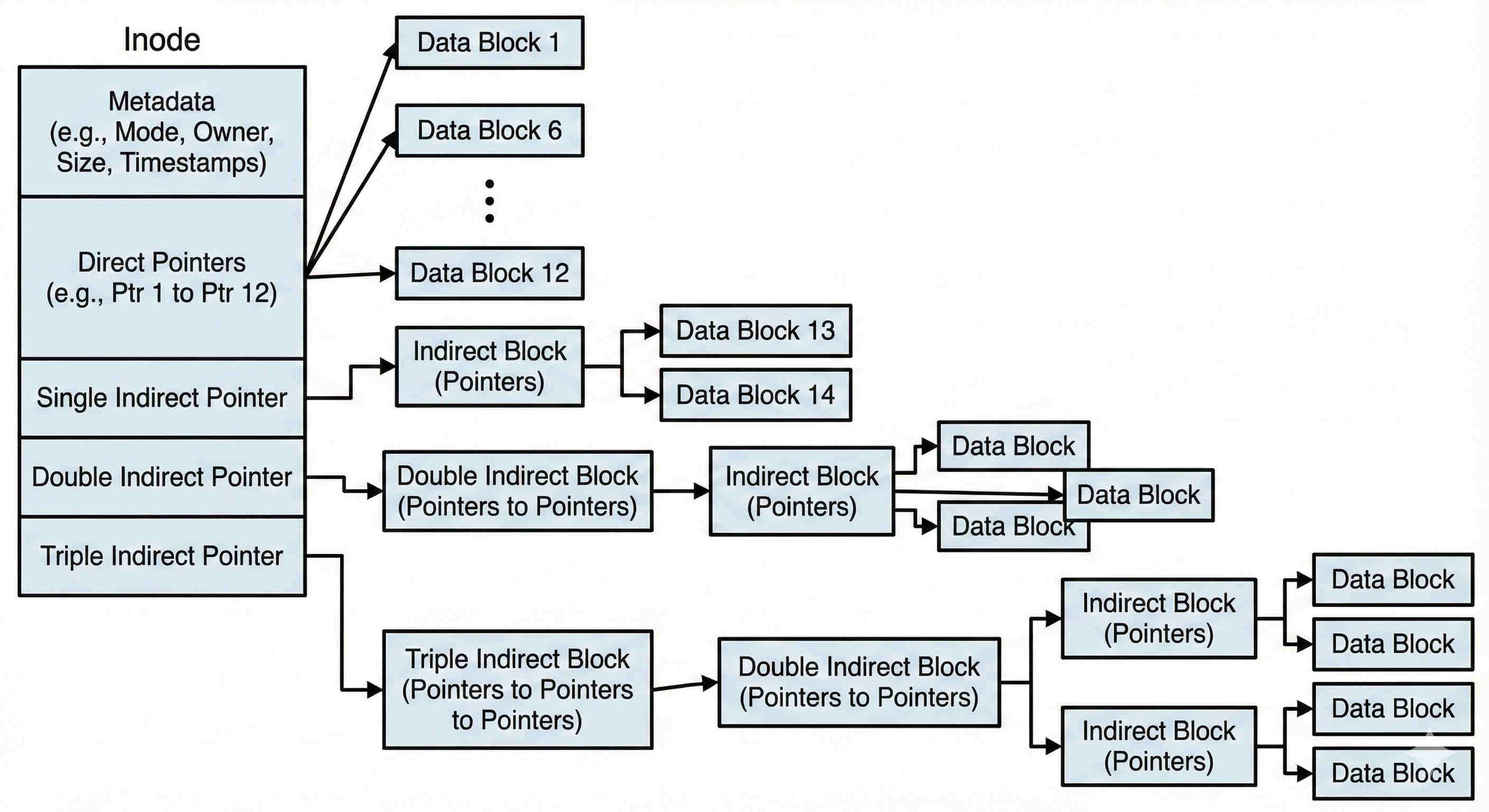
All the indirect blocks above are stored in the disk.
- Linked List File allocation/FAT has no inodes.
Comments
No comments yet.